-
×InformationNeed Windows 11 help?Check documents on compatibility, FAQs, upgrade information and available fixes.
Windows 11 Support Center. -

-
×InformationNeed Windows 11 help?Check documents on compatibility, FAQs, upgrade information and available fixes.
Windows 11 Support Center. -
- HP Community
- Notebooks
- Notebook Video, Display and Touch
- my screen goes white and all functions stop while using the ...

Create an account on the HP Community to personalize your profile and ask a question
03-08-2020 05:17 AM - edited 03-10-2020 03:13 PM
While I use my laptop suddenly it hangs but background processes continue like audio and network. For instance if I’m watching a movie it starts by getting stuck in a frame and then the screen slowly turns white. While this happens no input is being accepted by the system except the shortcuts for task manager and shutdown.
please I need immediate help as this is hampering my productivity
03-10-2020 10:57 AM
@Anonymous
I have gone through your Post and would like to help
I suggest you download and run the HP Support Assistant from this Link: https://www8.hp.com/us/en/campaigns/hpsupportassistant/hpsupport.html?jumpid=va_r602_us/en/any/psg/p...
HPSA will automatically search for all the latest drivers for your Notebook
-
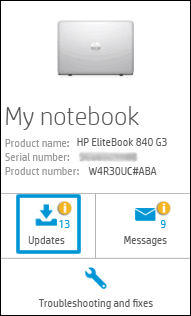
Click My devices in the top menu, and then click Updates in the My PC or My notebook pane.

-
Click Check for updates and messages to scan for new updates.

-
Review the list of updates. Updates with a yellow information icon are recommended. Updates with a blue information icon are optional.
-
Click the update name for a description, version number, and file size.
-
Select the box next to any updates you want to install, and then click Download and install.
Also ensure Windows is up to date.
Select the Start button, and then go to Settings > Update & security > Windows Update , and select Check for updates. If Windows Update says your device is up to date, you have all the updates that are currently available
If the issue persists run an Extensive system Test to confirm the Hardware Functionality
- Shut down the Notebook completely
- Turn it back on, then tap the Esc key repeatedly until the Startup menu screen is displayed.
- Press F2 to select System Diagnostics.
- Click System Tests, then click Extensive Test.
Keep me posted how it goes
Thank you and have a wonderful day 😊
If the information I've provided was helpful, give us some reinforcement by clicking the "Solution Accepted" on this Post and it will also help other community members with similar issue.
KrazyToad
I Am An HP Employee
03-10-2020 06:44 PM - edited 03-10-2020 06:46 PM
Thank you so much @KrazyToad for the quick response I tried both solutions that you offered. Unfortunately, none of them worked. And after updating all drivers and running all the tests the problems are still here. It has even worsened to affect boot up screen
03-11-2020 03:10 PM
@Anonymous
Thanks for keeping me posted
I suggest you perform a Reset. Please follow the instructions in this Link: https://support.hp.com/in-en/document/c04742289
If the information I've provided was helpful, give us some reinforcement by clicking the "Solution Accepted" on this Post and it will also help other community members with similar issue.
KrazyToad
I Am An HP Employee