• ×
    Information
    Need Windows 11 help?
    Check documents on compatibility, FAQs, upgrade information and available fixes.
    Windows 11 Support Center.
  • post a message
  • ×
    Information
    Need Windows 11 help?
    Check documents on compatibility, FAQs, upgrade information and available fixes.
    Windows 11 Support Center.
  • post a message
Guidelines
Join the HP Community Solve‑a‑thon | Help Others & Share Your Solutions | Live on Zoom | 2:30 PM to 2:30 AM IST | Every Wednesday Click here to know more
HP Recommended
pavilion 15-cd075nr
Microsoft Windows 10 (64-bit)

how to disable right click ( mouse) function when I touch the screen with two fingers? or any better ideas about play "Mobile Legends: Bang Bang" with "Big Nox"? I play "ML" with "NOX' on touchscreen.

1 REPLY 1
HP Recommended

@m4gvan
Thank you for posting on the HP Support Community.


TouchPad and ClickPad configuration options are located on the TouchPad properties page. Use the following steps to open the properties page and enable or disable individual settings.

  1. In the Windows search box, type TouchPad.

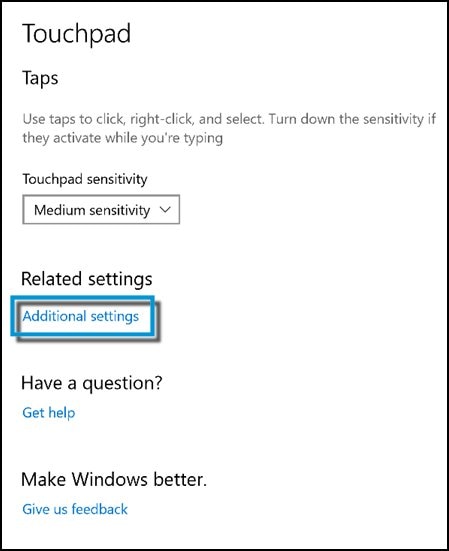
    From the results list click TouchPad settings.

  2. Click Additional settings.

    Clicking additional settings

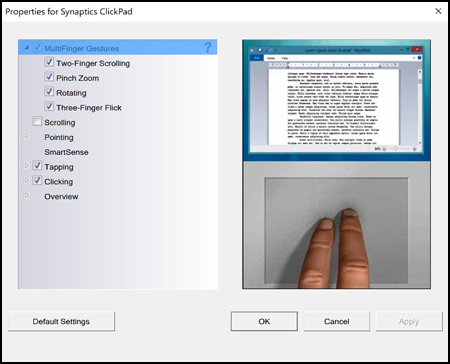
  3. Click the TouchPad or ClickPad Settings tab. If you have a Synaptics device, the tab includes the Synaptics icon  and might vary from the graphic.

    ClickPad settings

  4. You can adjust the settings for scrolling, clicking, sensitivity, edge behaviours, and gesture actions to suit your personal preferences.

    NOTE: Not all notebooks use a Synaptics TouchPad or ClickPad; however, all touchpads have similar features and configuration options.

    ClickPad Properties page

  5. The Properties window is divided into three areas to help you with TouchPad or ClickPad configuration 

  6. Turn on or off individual gestures by clicking on the checkbox next to each item. A checkmark in the checkbox indicates that gesture is enabled. And also you can change the click button settings under the Buttons tab. Under Button configuration, you can make selections to customize the button functions. 

Hope this helps! Keep me posted for further assistance.
Please click “
Accept as Solution” if you feel my post solved your issue, it will help others find the solution.

ECHO_LAKE
I am an HP Employee

† The opinions expressed above are the personal opinions of the authors, not of HP. By using this site, you accept the <a href="https://www8.hp.com/us/en/terms-of-use.html" class="udrlinesmall">Terms of Use</a> and <a href="/t5/custom/page/page-id/hp.rulespage" class="udrlinesmall"> Rules of Participation</a>.
-->