
-
×InformationNeed Windows 11 help?Check documents on compatibility, FAQs, upgrade information and available fixes.
Windows 11 Support Center. -
-
×InformationNeed Windows 11 help?Check documents on compatibility, FAQs, upgrade information and available fixes.
Windows 11 Support Center. -
- HP Community
- Notebooks
- Notebook Wireless and Networking
- Re: Always high ping on Pavilion 14

Create an account on the HP Community to personalize your profile and ask a question
Your account also allows you to connect with HP support faster, access a personal dashboard to manage all of your devices in one place, view warranty information, case status and more.
Check out our WINDOWS 11 Support Center info about: OPTIMIZATION, KNOWN ISSUES, FAQs, VIDEOS AND MORE.

It has been a while since anyone has replied. Simply ask a new question if you would like to start the discussion again.

07-01-2019 11:16 AM - edited 07-01-2019 11:21 AM
 HP Recommended
Product: Pavilion 14-ce004nl
Operating System: Microsoft Windows 10 (64-bit)
I have been experiencing this issue for a few months now and I can't find a solution: my laptop has an extremely unstable
Wi-Fi connection, no matter the distance from the router.
I have tried many wireless networks (my home, my university, my friends' houses) but the problem is related to my laptop.
The Windows 10 1903 update didn't solve the issue.
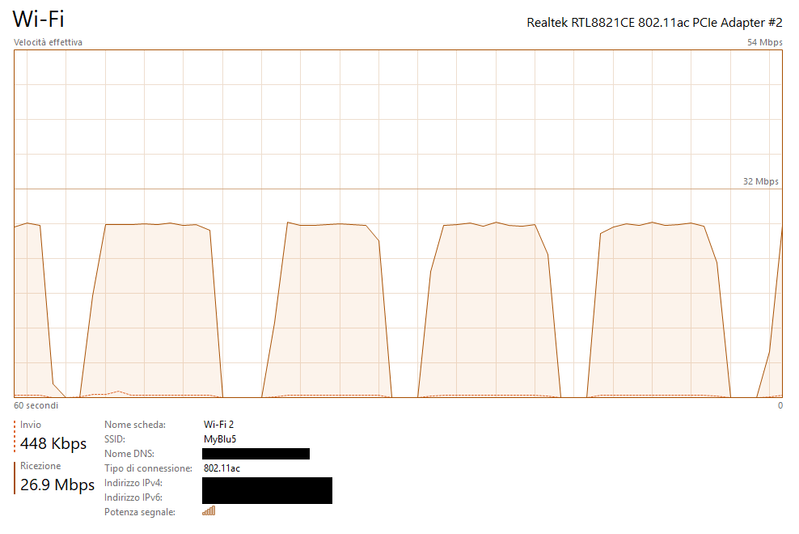
Here is a graph showing the practical problem: the speed should have been constant. (I was downloading a large file).
5 REPLIES 5


07-03-2019 03:20 PM
HP Recommended
Welcome to the HP Support Community!
I recommend you follow the steps in the below article and check if it helps.
https://support.hp.com/in-en/document/c06282875
Let me know how it goes and you have a great day!
If you wish to show appreciation for my efforts, mark my post as Accept as Solution. Your feedback counts!
Cheers!
The_Fossette
I am an HP Employee
07-04-2019 09:34 AM
HP Recommended
Perfect, I am really glad to hear that!
Please post your results, as I will be looking forward to hearing from you.
If you wish to show appreciation for my efforts, mark my post as Accept as Solution. Your feedback counts!
Cheers!
The_Fossette
I am an HP Employee
07-22-2019 08:15 AM
HP Recommended
Unfortunately the problem still remains, I always experience high ping when browsing. Speedtests don't tell the truth because the ping spikes happen every 5 seconds (more or less) and according to most speedtests I have a ping of about 14ms.
Specific ping tests show that the spikes are of 1.3 seconds, which means that I lose connection for more than 1 second every 5 seconds.
This is extremely annoying, I have tried all that I could.

07-22-2019 03:00 PM
HP Recommended
Please try these steps to fix this issue.
1. Open CMD with Administrator
2. Type: sc config storsvc type= own
( this resets this service to its default state )
3. Restart the PC.
4. Check if this fixes it.
I recommend you try to follow the below steps:
Go to Device manager > select the WIFI drivers under network adapter> Right click go to properties > Under properties go to Power Management Tab> Uncheck "Allow the computer to turn off this device to save power".
If it does not, please visit this link for further support: HP PCs - Troubleshooting Wireless Network and Internet (Windows 10)
Next thing, I would suggest here is to uninstall the wireless drivers from device manager:
Right-Click on start button> click device manager> Network adapters>then select the wireless drivers and right-click on it and uninstall the Wifi drivers.
Then restart the computer and check if you are able to go online.
Finally, please update the bios, chipset and wifi drivers from this link: http://hp.com/drivers Please select the country and follow the on-screen instructions.
Also, download and install HP support assistant on your PC. It should automatically download and install the latest updates and drivers for your PC.
Refer this link to know how to use HP support assistant.
I hope that helps.
To thank me for my efforts to help you, please mark my post as an accepted solution so that it benefits several others.
Cheers.
Sandytechy20
I am an HP Employee

Be alert for scammers posting fake support phone numbers and/or email addresses on the community.
If you think you have received a fake HP Support message, please report it to us by clicking on "Flag Post".
† The opinions expressed above are the personal opinions of the authors, not of HP. By using this site, you accept the Terms of Use and Rules of Participation.


Didn't find what you were looking for?
Ask the community
† The opinions expressed above are the personal opinions of the authors, not of HP. By using this site, you accept the <a href="https://www8.hp.com/us/en/terms-of-use.html" class="udrlinesmall">Terms of Use</a> and <a href="/t5/custom/page/page-id/hp.rulespage" class="udrlinesmall"> Rules of Participation</a>.