• ×
    Information
    Need Windows 11 help?
    Check documents on compatibility, FAQs, upgrade information and available fixes.
    Windows 11 Support Center.
  • post a message
  • ×
    Information
    Need Windows 11 help?
    Check documents on compatibility, FAQs, upgrade information and available fixes.
    Windows 11 Support Center.
  • post a message
Guidelines
Here is the solution to resolve the Realtek 8852BE-V Choya WiFi Disconnection Issue Click here to view the instructions!
Check out our WINDOWS 11 Support Center info about: OPTIMIZATION, KNOWN ISSUES, FAQs, VIDEOS AND MORE.
HP Recommended
HP Envy x360
Microsoft Windows 8.1 (64-bit)

Hello Team,


I face the problem that my laptop looses wifi connection all the time. Simply, my laptop drops from wifi connection even though, other devices like phone or laptops still on the wifi. 


I have tried to uninstall laptop wireless driver but the problem still occurs. 


Is there any suggestions?


Thanks much,

Ben


1 REPLY 1
HP Recommended

@Ben2592,


Welcome to the HP Support Community!


I reviewed your post and I understand that the computer is losing wireless connection randomly.


Don’t worry, I assure you I will try my best to get this sorted.


I recommend you follow the below steps and check if it helps.


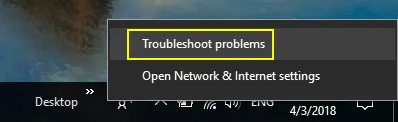
Windows 10 offers a handy option to troubleshoot network related issues. Simply right click on the WiFi icon on the taskbar tray and select “Troubleshoot problems” option.

Troubleshoot Network Connections

Troubleshoot Network Connections

This will open Windows Network Diagnostics and the system will automatically start detecting the network problems on your PC. Most of the time, this will help to fix wireless related issues.


If you continue facing the issue, then 

Find your wifi device in device manager under network adapters


Right click and select Properties, and then the Configure button of the device.

Select the Power Management tab, and the Deselect the checkbox for “Allow the computer to turn off this device to save power”


Then OK, or Apply.


Let me know how it goes and you have a great day!


If you wish to show appreciation for my efforts, mark my post as Accept as Solution. Your feedback counts!


Cheers!

The_Fossette
I am an HP Employee

† The opinions expressed above are the personal opinions of the authors, not of HP. By using this site, you accept the <a href="https://www8.hp.com/us/en/terms-of-use.html" class="udrlinesmall">Terms of Use</a> and <a href="/t5/custom/page/page-id/hp.rulespage" class="udrlinesmall"> Rules of Participation</a>.