
-
×InformationNeed Windows 11 help?Check documents on compatibility, FAQs, upgrade information and available fixes.
Windows 11 Support Center. -
-
×InformationNeed Windows 11 help?Check documents on compatibility, FAQs, upgrade information and available fixes.
Windows 11 Support Center. -
- HP Community
- Notebooks
- Notebook Wireless and Networking
- Mh HP notebook laptop is constantly dropping and connecting ...

Create an account on the HP Community to personalize your profile and ask a question
Your account also allows you to connect with HP support faster, access a personal dashboard to manage all of your devices in one place, view warranty information, case status and more.
Check out our WINDOWS 11 Support Center info about: OPTIMIZATION, KNOWN ISSUES, FAQs, VIDEOS AND MORE.

It has been a while since anyone has replied. Simply ask a new question if you would like to start the discussion again.

07-16-2017 08:52 PM
 HP Recommended
Product: HP Notebook
Operating System: Microsoft Windows 10 (64-bit)
My laptop has been connecting and disconnecting from my wifi for about 2 weeks. I CANT TAKE IT ANYMORE! I even reset my entire computer to factory settings. This isue is not happing on my work laptop OR my husbands laptop. Someone please help! Im at my wits ends with this.
Solved! Go to Solution.
1 ACCEPTED SOLUTION
Accepted Solutions


07-19-2017 06:24 AM
HP Recommended
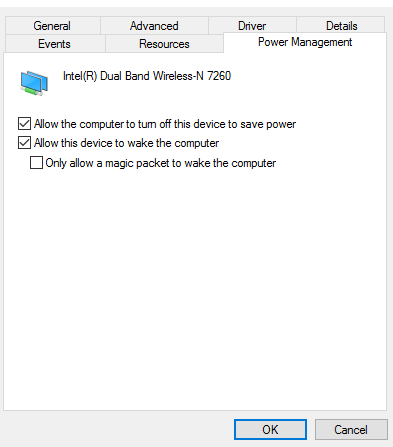
Thanks for the reply and trying the suggested steps. Recommend you open device manager and right-click on the wireless adapter and select Properties.
On the wireless adapter properties window. Go to the power management tab and uncheck "allow the computer to turn off this device to save power".
Run HP Support Assistant to make sure all the drivers are updated on your computer including BIOS. Click here to know about HPSA.
Let me know if this helped.
Chimney_83
I am an HP Employee
11 REPLIES 11
07-17-2017 02:41 PM
HP Recommended
Greetings @KMendo,
Thanks for the post.
I understand that you are facing intermittent wireless issues with your computer, is that right?
Not to worry, I will be glad to assist you.
Kudos to you for trying to troubleshoot the issue on your own.
Recommend you to install the wireless driver from this link.
Please check if the wireless adapter is enabled in device manager (check if there are any errors)
Open network and sharing center by doing right-click on the network icon the taskbar.
On the network and sharing center screen, select the option on the left - change adapter settings.
This would display the network adapters on the computer.
Right-click on the wireless adapter and check if it is enabled and try to connect to your network.
Let me know if this helped.
Chimney_83
I am an HP Employee
07-19-2017 06:24 AM
HP Recommended
Thanks for the reply and trying the suggested steps. Recommend you open device manager and right-click on the wireless adapter and select Properties.
On the wireless adapter properties window. Go to the power management tab and uncheck "allow the computer to turn off this device to save power".
Run HP Support Assistant to make sure all the drivers are updated on your computer including BIOS. Click here to know about HPSA.
Let me know if this helped.
Chimney_83
I am an HP Employee
07-19-2017 02:25 PM
HP Recommended
It is still dropping and reconnecting. I got this message from the HP diagnosis. I dont know if this helps but we have 2 wireless connections that I can connect to and it is not finding the second one. That is the one my work laptop and my husbands automatically connect to.

07-19-2017 02:29 PM
HP Recommended
Thanks for the reply, your computer only supports 2.4Ghz networks. If you are using a dual band router, please connect the computer to the 2.4Ghz network.
Let me know how it goes.
Chimney_83
I am an HP Employee
07-19-2017 09:45 PM
HP Recommended
Io looking at your previous comment about what I can connect to and I think you are wrong. I was connecting to the other wireless option we have and then all of a sudden it stopped. My connectivity is worse now and I cannot do anything on my computer. I am having to use my work computer. I NEED HELP! Do I need to call in? My warranty ends soon, maybe tomorrow, I cannot function like this. Can someone connect to my computer to fix it?? I also think is strange that my compuer AND our Hp wireless printer stopped working at the exact same time. Please help
07-20-2017 06:44 AM
HP Recommended
Thanks for the reply and trying the suggested steps.
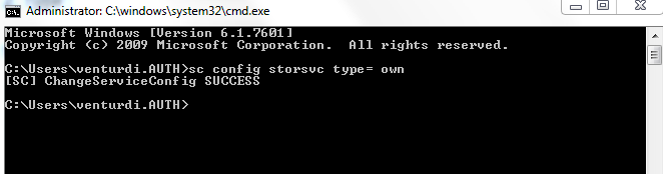
As the issue persists, recommend you run the command in command prompt as mentioned below and check.
1. Open CMD with Administrator
2. Type :
sc config storsvc type= own
( this resets this service to its default state )
3. Restart the PC.
Keep me posted.
Chimney_83
I am an HP Employee

Be alert for scammers posting fake support phone numbers and/or email addresses on the community.
If you think you have received a fake HP Support message, please report it to us by clicking on "Flag Post".
† The opinions expressed above are the personal opinions of the authors, not of HP. By using this site, you accept the Terms of Use and Rules of Participation.


Didn't find what you were looking for?
Ask the community
† The opinions expressed above are the personal opinions of the authors, not of HP. By using this site, you accept the <a href="https://www8.hp.com/us/en/terms-of-use.html" class="udrlinesmall">Terms of Use</a> and <a href="/t5/custom/page/page-id/hp.rulespage" class="udrlinesmall"> Rules of Participation</a>.