• ×
    Information
    Need Windows 11 help?
    Check documents on compatibility, FAQs, upgrade information and available fixes.
    Windows 11 Support Center.
  • post a message
  • ×
    Information
    Need Windows 11 help?
    Check documents on compatibility, FAQs, upgrade information and available fixes.
    Windows 11 Support Center.
  • post a message
Guidelines
Join the HP Community Solve‑a‑thon | Help Others & Share Your Solutions | Live on Zoom | 2:30 PM to 2:30 AM IST | Every Wednesday Click here to know more
Check out our WINDOWS 11 Support Center info about: OPTIMIZATION, KNOWN ISSUES, FAQs, VIDEOS AND MORE.
HP Recommended
EC1019nt
Microsoft Windows 11

After switching to Windows 11 my Bluetooth performance dropped a lot. I was able to use both my AirPods and controller on my laptop and there was no problem but now if i use them together at the sametime controller delays my input and Airpod's sound cut out after sometime and it comes to a point where i can't even hear a thing even if it's connected. I've tried numerous Bluetooth drivers and adapter drivers but they couldn't solve the problem


Realtek Bluetooth 5 Adapter Driver: 1.9.1038.3001

Realtek 8822CE PCIe Adapter Driver: 2024.0.10.224


By the way if i connect my Bluetooth 4.0 dongle in to the laptop everything fine flawlessly. no delay or cutout or any issues.

4 REPLIES 4
HP Recommended

Why there's no support?

HP Recommended

Hi@morrowindmemes,


Welcome to HP Community


I have gone through your post and would like to help


I suggest you download and run the HP Support Assistant from this Link: https://www8.hp.com/us/en/campaigns/hpsupportassistant/hpsupport.html?jumpid=va_r602_us/en/any/psg/p...


HPSA will automatically search for all the latest drivers for your Notebook


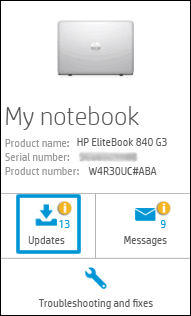
  1. Click My devices in the top menu, and then click Updates in the My PC or My notebook pane.

    Click Updates in the My notebook pane

  2. Click Check for updates and messages to scan for new updates.

     Updates list in HP Support Center

  3. Review the list of updates. Updates with a yellow information icon are recommended. Updates with a blue information icon are optional.

  4. Click the update name for a description, version number, and file size.

  5. Select the box next to any updates you want to install, and then click Download and install.

Also ensure Windows is up to date.


Select the Start button, and then go to Settings  > Update & security  > Windows Update, and select Check for updates. If Windows Update says your device is up to date, you have all the updates that are currently available


Hope this helps! Keep me posted.


Please click “Accept as Solution” if you feel my post solved your issue, it will help others find the solution.

Have a great day! 

HP Recommended

Thanks for your help but i get this whenever i try to update the drivers: 

morrowindmemes_0-1637177759184.png


HP Recommended

Hi@morrowindmemes,


Try updating the BIOS and chipset driver on your PC and check if it helps.


1Check for the BIOS update & Windows updated


2. uninstall the Bluetooth devices from the devices manager.


HP PCs - Connecting a Bluetooth Device (Windows) LInk


Hope that answers your question and you have a great day!


† The opinions expressed above are the personal opinions of the authors, not of HP. By using this site, you accept the <a href="https://www8.hp.com/us/en/terms-of-use.html" class="udrlinesmall">Terms of Use</a> and <a href="/t5/custom/page/page-id/hp.rulespage" class="udrlinesmall"> Rules of Participation</a>.