
-
×InformationNeed Windows 11 help?Check documents on compatibility, FAQs, upgrade information and available fixes.
Windows 11 Support Center. -
-
×InformationNeed Windows 11 help?Check documents on compatibility, FAQs, upgrade information and available fixes.
Windows 11 Support Center. -
- HP Community
- Notebooks
- Notebook Wireless and Networking
- Re: This site can’t be reached

Create an account on the HP Community to personalize your profile and ask a question
Your account also allows you to connect with HP support faster, access a personal dashboard to manage all of your devices in one place, view warranty information, case status and more.
Check out our WINDOWS 11 Support Center info about: OPTIMIZATION, KNOWN ISSUES, FAQs, VIDEOS AND MORE.

It has been a while since anyone has replied. Simply ask a new question if you would like to start the discussion again.

10-20-2022 02:43 AM
 HP Recommended
Product: HP Pavilion - 15-au113tx
Operating System: Microsoft Windows 11
This site can’t be reached
"Website address" took too long to respond.
Try:
Checking the connection
Checking the proxy and the firewall
Running Windows Network Diagnostics
ERR_TIMED_OUT
seeing the above error in chrome after login and try to open a web page.
Every time I have to click on "Running Windows Network Diagnostics" mutiple times to resolve this issue.
7 REPLIES 7

10-20-2022 03:37 AM
HP Recommended
Hello @Suresh_Desk
Sorry to hear that you are having problems ... I would like to help you.
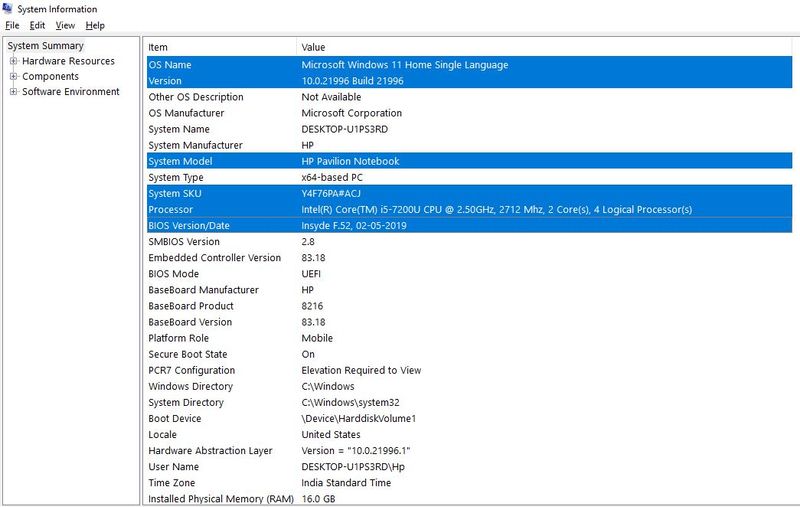
Let me check your basic system configuration. |
(1) Run msinfo32
- Select <System Summary>:
--->>> Copy/screenshot/paste following key/value pairs:
OS Name |
Version |
System Model |
System SKU ( equals HP product number (p/n) ) |
Processor |
BIOS Version/Date |
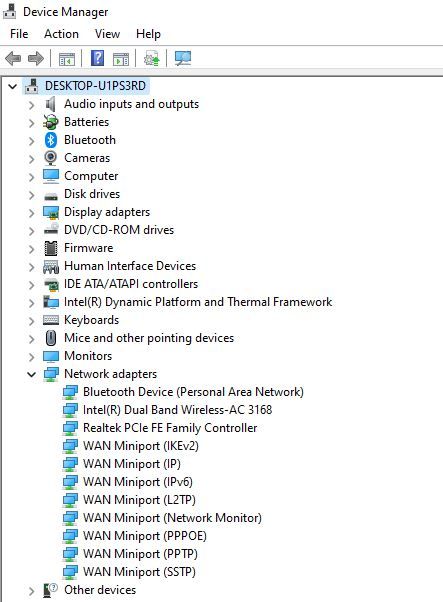
(2) Start Windows <Device Manager>
- Expand <Network adapters>
--->>> Send screenshot
(3) Please report your results
10-20-2022 04:04 AM
HP Recommended
Hello @Suresh_Desk
Thanks for reporting.
(1) Create Windows system <restore point>
How to Create a System Restore Point on Windows 10 or Windows 11
(2) Download and install BIOS Update
HP Notebook System BIOS Update | F.56 Rev.A | 19.0 MB | Dec 18, 2020 | Download |
Why should you install the update ? https://support.hp.com/us-en/document/ish_4123786-2338478-16 Quote: " Updating the BIOS is recommended as standard maintenance of the computer. It can also help resolve the following issues:
" |
(3) Reboot
(4) Let BIOS be installed until it's completely done !
(5) Visit --->>> Intel Wi-Fi Site
- Download and install WiFi-22.170.0-Driver64-Win10-Win11.exe driver

(6) Restart Windows
(7) Test your notebook and wireless connection
(8) Please report your results

11-15-2022 03:10 AM
HP Recommended
Hello @Suresh_Desk
(1) Reset network
How to Reset Network Settings in Windows 11
(2) Restart Windows
(3) Test again
(4) Please report your results

Be alert for scammers posting fake support phone numbers and/or email addresses on the community.
If you think you have received a fake HP Support message, please report it to us by clicking on "Flag Post".
† The opinions expressed above are the personal opinions of the authors, not of HP. By using this site, you accept the Terms of Use and Rules of Participation.


Didn't find what you were looking for?
Ask the community
† The opinions expressed above are the personal opinions of the authors, not of HP. By using this site, you accept the <a href="https://www8.hp.com/us/en/terms-of-use.html" class="udrlinesmall">Terms of Use</a> and <a href="/t5/custom/page/page-id/hp.rulespage" class="udrlinesmall"> Rules of Participation</a>.