• ×
    Information
    Need Windows 11 help?
    Check documents on compatibility, FAQs, upgrade information and available fixes.
    Windows 11 Support Center.
  • post a message
  • ×
    Information
    Need Windows 11 help?
    Check documents on compatibility, FAQs, upgrade information and available fixes.
    Windows 11 Support Center.
  • post a message
Guidelines
Here is the solution to resolve the Realtek 8852BE-V Choya WiFi Disconnection Issue Click here to view the instructions!
Check out our WINDOWS 11 Support Center info about: OPTIMIZATION, KNOWN ISSUES, FAQs, VIDEOS AND MORE.
HP Recommended
pavilion g6-1d40ca
Microsoft Windows 10 (64-bit)

Hi there,


I have a pavilion g6-1d40ca that has an issue with the wifi 2.5ghz card.  I would like to replace it w/ a 5GHz card and need to find a complatible one w/ this AMD processor.  I know it's an old machine but it works great (other than wifi at the moment).  Any help would be greatly appreciated.

1 ACCEPTED SOLUTION

Accepted Solutions
HP Recommended


@Raphael2019

Welcome to HP Forums,

Let's get straight to it!


HP doesn't recommend upgrading parts as the device is already set to work at its optimal performance, however, if you wish to replace the part at your own discretion, here's a list of parts tested and approved by HP:

You may check the upgrade and maintenance guide: Click here to view it


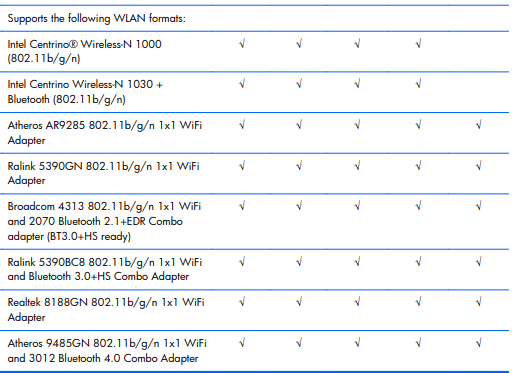
Here's the screenshot with the supported WLAN cards:


I would personally suggest getting an external USB Wireless dongle as it would be portable and easy to install, you can get one at any local online store as it doesn't have any compatibility issues either!


Keep me posted, as I (Or a trusted colleague) shall follow-up on this case to ensure the concern has been addressed, 

And your device is up and running again, only in case you don't get back to us, first! 

That said, If the information I've provided was helpful, give us some reinforcement by clicking the solution and kudos buttons, 

That'll help us, and others see that we've got the answers!

Good Luck.

Riddle_Decipher
I am an HP Employee


Learning is a journey, not a destination.
Let's keep asking questions and growing together.

View solution in original post

3 REPLIES 3
HP Recommended


@Raphael2019

Welcome to HP Forums,

Let's get straight to it!


HP doesn't recommend upgrading parts as the device is already set to work at its optimal performance, however, if you wish to replace the part at your own discretion, here's a list of parts tested and approved by HP:

You may check the upgrade and maintenance guide: Click here to view it


Here's the screenshot with the supported WLAN cards:


I would personally suggest getting an external USB Wireless dongle as it would be portable and easy to install, you can get one at any local online store as it doesn't have any compatibility issues either!


Keep me posted, as I (Or a trusted colleague) shall follow-up on this case to ensure the concern has been addressed, 

And your device is up and running again, only in case you don't get back to us, first! 

That said, If the information I've provided was helpful, give us some reinforcement by clicking the solution and kudos buttons, 

That'll help us, and others see that we've got the answers!

Good Luck.

Riddle_Decipher
I am an HP Employee


Learning is a journey, not a destination.
Let's keep asking questions and growing together.
HP Recommended

Thank you for your support.  I agree with buying a USB dongle.  So far, ordered one from Amazon (https://www.amazon.ca/gp/product/B011T5IF06/ref=ppx_yo_dt_b_asin_title_o01__o00_s00?ie=UTF8&psc=1) and it works like a charm.  Thank you for your time.


Raphael

HP Recommended


@Raphael2019 That's a wise choice! And I'm glad it's working fine.

Let us know if you ever need anything else and have a great day ahead.

Take care.

Riddle_Decipher
I am an HP Employee


Learning is a journey, not a destination.
Let's keep asking questions and growing together.
† The opinions expressed above are the personal opinions of the authors, not of HP. By using this site, you accept the <a href="https://www8.hp.com/us/en/terms-of-use.html" class="udrlinesmall">Terms of Use</a> and <a href="/t5/custom/page/page-id/hp.rulespage" class="udrlinesmall"> Rules of Participation</a>.