
-
×InformationNeed Windows 11 help?Check documents on compatibility, FAQs, upgrade information and available fixes.
Windows 11 Support Center. -
-
×InformationNeed Windows 11 help?Check documents on compatibility, FAQs, upgrade information and available fixes.
Windows 11 Support Center. -
- HP Community
- Notebooks
- Notebook Wireless and Networking
- WIFI getting Completely slowed down when connected to Blueto...

Create an account on the HP Community to personalize your profile and ask a question
Your account also allows you to connect with HP support faster, access a personal dashboard to manage all of your devices in one place, view warranty information, case status and more.
Check out our WINDOWS 11 Support Center info about: OPTIMIZATION, KNOWN ISSUES, FAQs, VIDEOS AND MORE.

It has been a while since anyone has replied. Simply ask a new question if you would like to start the discussion again.

04-02-2020 11:28 PM - edited 04-02-2020 11:40 PM
 HP Recommended
Product: HP NOTEBOOK - 15-ay523tu
Operating System: Microsoft Windows 10 (64-bit)
HP NOTEBOOK -15-ay523tu
Intel(R) Dual Band Wireless-AC 3165
Intel(R) Core(TM) i3-5005U CPU @ 2.00GHz
Solved! Go to Solution.
1 ACCEPTED SOLUTION
Accepted Solutions


04-09-2020 08:31 PM
HP Recommended
@MAHI17
Thank you for posting back.
Let's run the Audio test from the HP PC Hardware Diagnostics:
-
To download the latest version of the HP PC Hardware Diagnostics for Windows, go to the HP Hardware Diagnostics website.
-
In the HP PC Hardware Diagnostics Windows section, click Download Diagnostics Windows, and then follow the on-screen instructions to download and install the software.
-
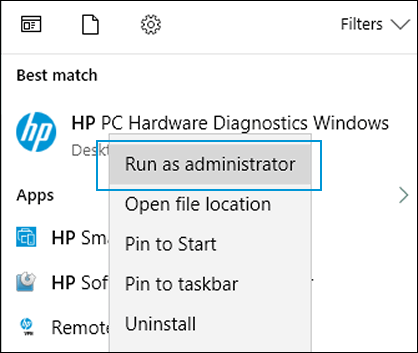
In Windows, search for HP PC Hardware Diagnostics Windows, right-click the app in the search results, and then select Run as administrator.
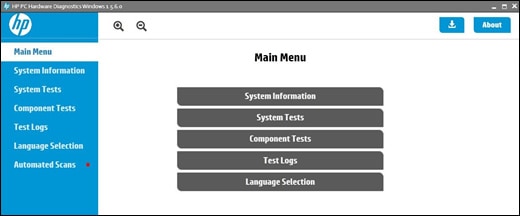
The HP PC Hardware Diagnostics Main Menu displays.
-
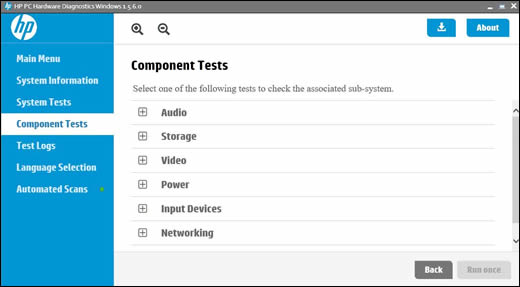
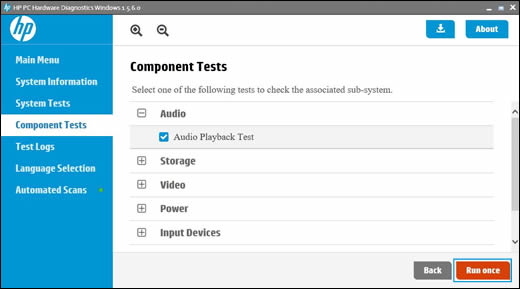
Click Component Tests.
-
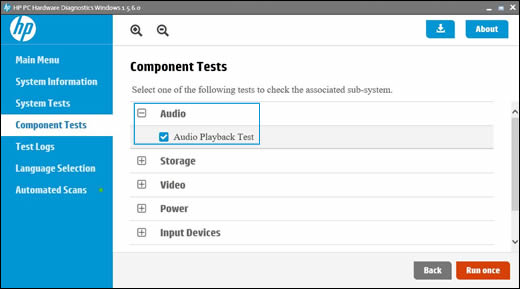
On the Component Tests menu window, click Audio, and then select Audio Playback Test.
-
Click Run once.
-
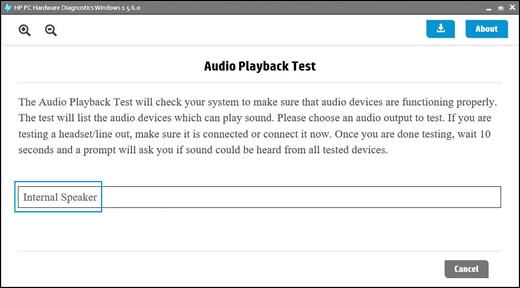
Click Next, and then select an audio playback device to begin the test.
During the test, a few music notes play in sequence and repeatedly.
-
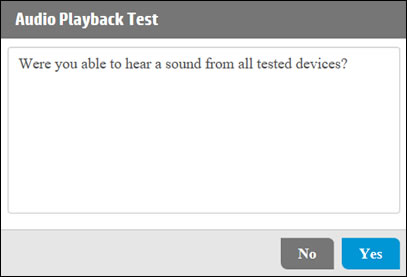
When the Audio Test completes, click Yes or No, depending on what you heard during the audio test.
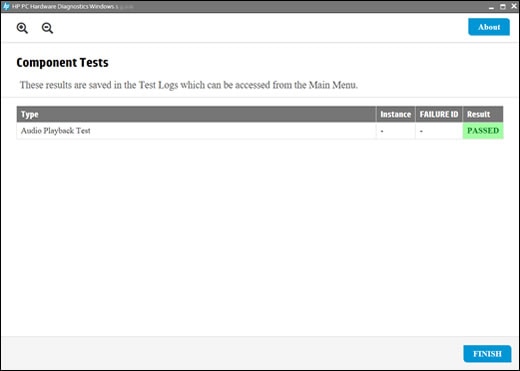
The audio test results display on the screen.
-
If the audio test result passes, click Finish, close the tool, and then restart the computer.
-
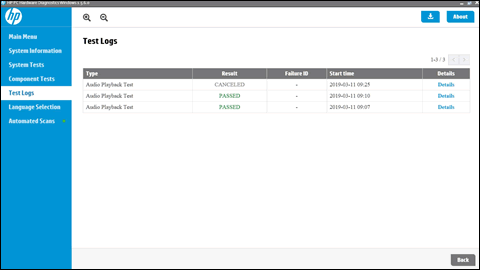
If the audio test fails, write down the failure ID (24-digit code) so you have it available when you contact HP Customer Support. This information is also available in Test Logs.
-
Hope this helps! Keep me posted for further assistance.
Please click “Accept as Solution” if you feel my post solved your issue, it will help others find the solution.
ECHO_LAKE
I am an HP Employee
3 REPLIES 3
04-08-2020 02:24 PM
HP Recommended
Thank you for posting on the HP Support Community.
Don't worry as I'll be glad to help, however, to provide an accurate resolution, I need a few more details:
- Did this happen after a recent window or software update?
- Have you made any hardware/software changes?
- Have you tried any troubleshooting steps?
- Did you make any changes to the settings of your PC prior to the issue?
- When was the last time it worked fine?
While you respond to that, let's try these steps:
Hard Reset: Follow steps from the link: https://hp.care/2GnkMa8. (do not skip any troubleshooting steps even if you feel steps are repeating)
BIOS default:
- Turn off the computer and wait five seconds.
- Press the Power button to start the computer and repeatedly press the F10 key to enter the BIOS setup menu.
- On the BIOS Setup screen, press F9 to select and load the BIOS Setup Default settings.
- Press F10 to Save and Exit.
- Use the arrow keys to select Yes, then press Enter when asked Exit Saving Changes?
- Follow the prompts to restart your computer. If the issue persists, follow the next steps.
Perform Windows Update and HP Support Assistant: (do not skip any troubleshooting steps if you feel steps are repeating)
To check for updates now, select the Start button, and then go to Settings > Update & security > Windows Update, and select Check for updates.
Install updates from HP Support Assistant: Go to Download HP Support Assistant to install the tool.
- To open HP Support Assistant, double-click the HP Support Assistant icon
 .
. - Click My devices in the top menu, and then click Updates in the My PC or My notebook pane.
- Click Check for updates and messages to scan for new updates.
- Review the list of updates. Updates with a yellow information icon are recommended. Updates with a blue information icon are optional.
- Click the update name for a description, version number, and file size.
- Select the box next to any updates you want to install, and then click Download and install.
Hope this helps! Keep me posted for further assistance.
Please click “Accept as Solution” if you feel my post solved your issue, it will help others find the solution.
ECHO_LAKE
I am an HP Employee
04-08-2020 10:06 PM
HP Recommended
Yes i have recent changes in Hard disk and OS but i didn't connect Bluetooth speakers before that , now I'm Required to connect to it because normal audio is not coming out as the Sound card is not working was said by the local repair shop workers, And After completing above mentioned steps it's still the same
04-09-2020 08:31 PM
HP Recommended
@MAHI17
Thank you for posting back.
Let's run the Audio test from the HP PC Hardware Diagnostics:
-
To download the latest version of the HP PC Hardware Diagnostics for Windows, go to the HP Hardware Diagnostics website.
-
In the HP PC Hardware Diagnostics Windows section, click Download Diagnostics Windows, and then follow the on-screen instructions to download and install the software.
-
In Windows, search for HP PC Hardware Diagnostics Windows, right-click the app in the search results, and then select Run as administrator.
The HP PC Hardware Diagnostics Main Menu displays.
-
Click Component Tests.
-
On the Component Tests menu window, click Audio, and then select Audio Playback Test.
-
Click Run once.
-
Click Next, and then select an audio playback device to begin the test.
During the test, a few music notes play in sequence and repeatedly.
-
When the Audio Test completes, click Yes or No, depending on what you heard during the audio test.
The audio test results display on the screen.
-
If the audio test result passes, click Finish, close the tool, and then restart the computer.
-
If the audio test fails, write down the failure ID (24-digit code) so you have it available when you contact HP Customer Support. This information is also available in Test Logs.
-
Hope this helps! Keep me posted for further assistance.
Please click “Accept as Solution” if you feel my post solved your issue, it will help others find the solution.
ECHO_LAKE
I am an HP Employee

Be alert for scammers posting fake support phone numbers and/or email addresses on the community.
If you think you have received a fake HP Support message, please report it to us by clicking on "Flag Post".
† The opinions expressed above are the personal opinions of the authors, not of HP. By using this site, you accept the Terms of Use and Rules of Participation.


Didn't find what you were looking for?
Ask the community
† The opinions expressed above are the personal opinions of the authors, not of HP. By using this site, you accept the <a href="https://www8.hp.com/us/en/terms-of-use.html" class="udrlinesmall">Terms of Use</a> and <a href="/t5/custom/page/page-id/hp.rulespage" class="udrlinesmall"> Rules of Participation</a>.