
-
×InformationNeed Windows 11 help?Check documents on compatibility, FAQs, upgrade information and available fixes.
Windows 11 Support Center. -
-
×InformationNeed Windows 11 help?Check documents on compatibility, FAQs, upgrade information and available fixes.
Windows 11 Support Center. -
- HP Community
- Notebooks
- Notebook Wireless and Networking
- Re: laptop HP17-e048ca upgrade to 5GHz wi-fi.

Create an account on the HP Community to personalize your profile and ask a question
Your account also allows you to connect with HP support faster, access a personal dashboard to manage all of your devices in one place, view warranty information, case status and more.
Check out our WINDOWS 11 Support Center info about: OPTIMIZATION, KNOWN ISSUES, FAQs, VIDEOS AND MORE.

It has been a while since anyone has replied. Simply ask a new question if you would like to start the discussion again.

04-07-2019 10:42 AM - edited 04-07-2019 10:44 AM
 HP Recommended
Product: Pavilion 17-e048ca
Operating System: Microsoft Windows 8 (64-bit)
Hello, I own a laptop HP17-e048ca (with AMD Processor). I want to upgrade it to 5GHz wi-fi. Is there any wi-fi card that can be installed in my laptop?
12 REPLIES 12


04-07-2019 10:48 AM
HP Recommended
Hi:
Yes, there is.
You can install this model wifi adapter...
Broadcom BCM4352 802.11ac 2x2 Wi-Fi + Bluetooth 4.0 combo HP part # 724935-001.
You should be able to find that model wifi card on Amazon or eBay.
Do your search by the HP part number, not the model of the wifi card.
04-07-2019 11:18 AM - edited 04-07-2019 11:20 AM
HP Recommended
According to the parts list for your notebook, is the card your notebook has in it now...see the 2nd picture I posted.
It has two terminals and there should be two antenna cables connected to it.
The Broadcom card you need is thhis one picture I posted...same thing, same HMC form factor...two terminals, and needs two antenna cables. The different number of contacts on the bottom of the card is of no consequence.
The card was not offered for your notebook's model series, which is why it is not listed in your notebook's service manual.
However, other forum members have installed this card, and it works just fine in any 15e or 17e notebook with an Intel or AMD processor.


04-10-2019 07:03 AM - edited 04-10-2019 07:03 AM
HP Recommended
They couldn't be more wrong.
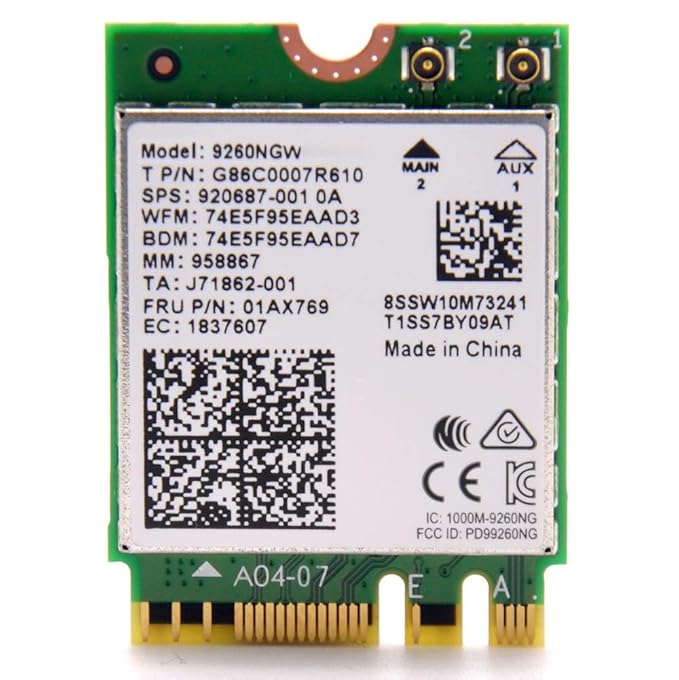
That card won't even fit in the wireless slot.
It is a totally different form factor, and I think the antenna terminals on the card are smaller than the antenna cable connectors in your notebook.
Take a look at a picture of the Intel 9260 and compare it to the Ralink wifi card you have now.
It would be like putting a square peg in a round hole...trust me...I have given you the best card that will work in your model.
No Intel card will work in your AMD notebook.
04-10-2019 09:39 AM
HP Recommended
You're very welcome.
W10 should install the drivers for that card automatically, but here are the links to the latest W10 wifi and bluetooth drivers HP has for that model wifi card.
Wifi:
https://ftp.hp.com/pub/softpaq/sp78001-78500/sp78044.exe
BT:
https://ftp.hp.com/pub/softpaq/sp75001-75500/sp75330.exe
I guess you can download and save them now so you have them.
This is what I reccommend...when you get your new card, first uninstall the Ralink wifi and bluetooth devices in the device manager, and check the uninstall driver boxes.
If there is any Ralink bluetooth software listed in the Windows control panel>Programs, uninstall that too.
Then shut down the PC, unplug it, remove the battery and install the BCM wifi card.

Be alert for scammers posting fake support phone numbers and/or email addresses on the community.
If you think you have received a fake HP Support message, please report it to us by clicking on "Flag Post".
† The opinions expressed above are the personal opinions of the authors, not of HP. By using this site, you accept the Terms of Use and Rules of Participation.


Didn't find what you were looking for?
Ask the community
† The opinions expressed above are the personal opinions of the authors, not of HP. By using this site, you accept the <a href="https://www8.hp.com/us/en/terms-of-use.html" class="udrlinesmall">Terms of Use</a> and <a href="/t5/custom/page/page-id/hp.rulespage" class="udrlinesmall"> Rules of Participation</a>.