• ×
    Information
    Need Windows 11 help?
    Check documents on compatibility, FAQs, upgrade information and available fixes.
    Windows 11 Support Center.
  • post a message
  • ×
    Information
    Need Windows 11 help?
    Check documents on compatibility, FAQs, upgrade information and available fixes.
    Windows 11 Support Center.
  • post a message
Guidelines
Seize the moment! nominate yourself or a tech enthusiast you admire & join the HP Community Experts!
Archived This topic has been archived. Information and links in this thread may no longer be available or relevant. If you have a question create a new topic by clicking here and select the appropriate board.

HP Recommended

Hey,

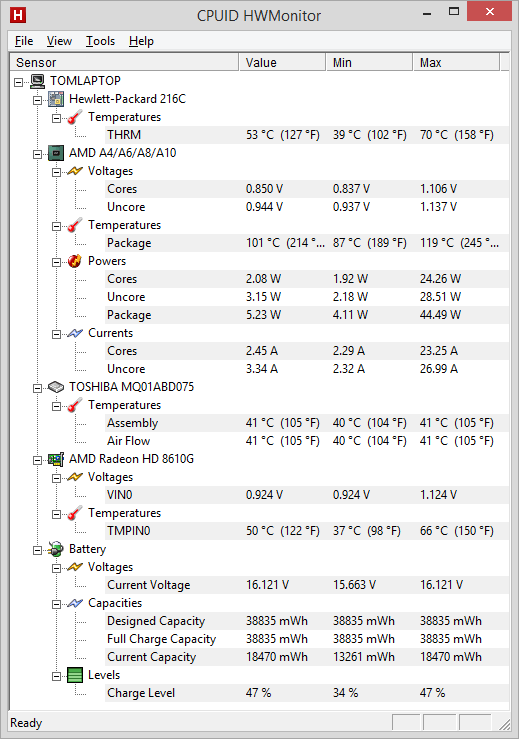
I recently got the HP Pavilion 15-n203ed, I installed Speccy to see if the temperatures were good and saw that my APU/CPU temperature was going between 100-120 degrees Celcius on the High Performance preset while the other components are between 30-70 degrees Celcius depending on the load.

I later checked while not having it charged and the APU/CPU temperature was 80-95 degrees Celcius.

I also tried checking it with HWMonitor, as HP recommends, and it still reports the same temperatures.


Is this something to be worried about or is this normal/ to be expected?


Here is a screenshot from HWMonitor:


Here is a screenshots of the temperatures after playing a game of Counter Strike: Global Offensive @ medium settings +/-60fps while being connected to the charger:

hightemps.png


As you can see it reached up to 119 degrees Celcius, please don't tell me that this is normal.

3 REPLIES 3
HP Recommended

Hello TdeW, welcome to the HP Forums.

I see that you're concerned about the temperatures that you're seeing with the notebook and with good reason too. It shouldn't be getting that hot. I will do what I can to assist you on this issue.

I'd recommend starting with this document:
    Reducing Heat Inside the PC to Prevent Overheating.
Make sure to complete every step and to utilize any sub-documents it provides you.

Let me know how everything goes.
Thank you for posting on the HP Forums.

I worked on behalf of HP.
HP Recommended

Thanks for the answer, I'm not sure though if it will help since the laptop is only a couple of weeks old.

I will try to contact the store where I bought it from and see if I can get a new one.


I'm going to give the hardware test a try tommorow.


Edit: Ran all the tests, including the UEFI ones and everything passed.

HP Recommended

i think it is HP Pavilion's behavior so always keep a distance between the ground and the laptop and get cooling fan

i wouldn't recomend this laptop as it gets high cpu usage and temp with out nothing

if you search for normal cpu temp you could get maxium to 60-50 C  while this laptop goes up to 80 C 

Archived This topic has been archived. Information and links in this thread may no longer be available or relevant. If you have a question create a new topic by clicking here and select the appropriate board.
† The opinions expressed above are the personal opinions of the authors, not of HP. By using this site, you accept the <a href="https://www8.hp.com/us/en/terms-of-use.html" class="udrlinesmall">Terms of Use</a> and <a href="/t5/custom/page/page-id/hp.rulespage" class="udrlinesmall"> Rules of Participation</a>.