
-
×InformationNeed Windows 11 help?Check documents on compatibility, FAQs, upgrade information and available fixes.
Windows 11 Support Center. -
-
×InformationNeed Windows 11 help?Check documents on compatibility, FAQs, upgrade information and available fixes.
Windows 11 Support Center. -
- HP Community
- Archived Topics
- Notebooks Archive
- HP spectre x360 keeps crashing

Create an account on the HP Community to personalize your profile and ask a question
Your account also allows you to connect with HP support faster, access a personal dashboard to manage all of your devices in one place, view warranty information, case status and more.
 This topic has been archived. Information and links in this thread may no longer be available or relevant. If you have a question create a new topic by clicking here and select the appropriate board.

01-09-2020 08:53 PM
 HP Recommended
Product: HP spectre x360 convertible 13-ae0xx
Operating System: Microsoft Windows 10 (64-bit)
Hi,
My hp spectre x360 keeps crashing. I started getting blue screens of death so I reset my PC twice. The problem stopped for a day each time I reset my PC but now it keeps crashing. I turned off automatic restarts and now after a while of using it, the PC stays on but all programs close and my screen just becomes black and I can only see my mouse. Sometimes I receive an "exception processing message" before it crashes. All of my drivers are up to date. I've performed a hardware test and no problems were found, what can I do?
4 REPLIES 4


01-09-2020 11:40 PM
HP Recommended
Hi,
I would try performing a clean install of the latest version of Windows 10 on the notebook and see if the problem persists. First, back up any important data to an external drive. Here is a guide to install Windows
Download media creation tool from Microsoft on PC (different PC), run and create a bootable pendrive with the OS on it. (there is an explanation on the Microsoft web page on how to create the pendrive). Create the drive with Windows 10 Home 64-bit edition. Windows will automatically activate once installed and connected to the Internet.
https://www.microsoft.com/en-us/software-download/windows10
If you choose this option you will need to use the pendrive to perform a clean install of Windows 10. You might need to disable fastboot and secure boot in BIOS (probably not). So, insert the pendrive in the PC and it should boot directly from the drive. If not, turn off the PC by holding the power button. Press the power button and immediately keep pressing ESC until the startup menu appears and then press F9 and choose the pendrive in the boot menu. Once it boots from pendrive follow the procedure to install Windows. Choose custom install and delete all partitions. Install in unallocated space.
When finished installing allow Windows to completely update and find all or most drivers. You can follow this process by going into settings > Security and update > click on Verify for updates. You might need to reboot a couple of times.
I recommend installing HP support assistant which will help keep your drivers up to date and much more. You can download the latest version from here.
https://www8.hp.com/us/en/campaigns/hpsupportassistant/hpsupport.html
Once completely updated you can go into device manager and see if there are any missing drivers (there will be yellow exclamation mark next to the device). You can find these drivers and software on HP support page for your product.
Hope it helps,
David
Please click on thumbs up for thanks
Please click on accept as solution if answered your question
Follow these steps to create installation media (USB flash drive or DVD) you can use to install a new copy of Windows 10, perform a clean installation, or reinstall Windows 10. Before you download the tool make sure you have: An internet connection (internet service provider fees may apply) ...

Specifications Mfr Part Number: CT500P1SSD8 capacity:   500GB form factor: M.2 2280 interface: PCIe NVMe Gen 3 NAND flash: micron 3D qlc NAND performance: Sequential Read rate: 1, 900 MB/s sequential Write rate: 950 MB/s 4KB random read: 90, 000 IOPS 4KB random Write: 220, 000 IOPS MTBF: 1.5...
01-10-2020 10:46 AM
HP Recommended
I have similar issue with my Spectre x360, I am using it last 2 year plus. This issue started appearing last few months, I have performed hardware diagnose, there is no issue found. Reinstalled windows 10 twice, and updated with drivers from hp. Still the issue exists. Not finding any useful lead from event log.
I don't have warranty for this laptop anymore.
Any help would be greatly apricated.
02-11-2020 11:50 AM
HP Recommended
I am having this issue with my spectre too. Reinstalling OS is not a fix I’ve tried it numerous times. Just a waste of time. No issues are diagnosed, hp assistant is running and all up to date, and everything else is up to date too. It may crash up to 20 times a day. Get black screen indicating no operating system found. Then I cold boot and it starts fine then 30 mins to and hour later it crashes again. Extremely frustrating since this was an expensive laptop and it’s pretty much an unstable brick now.


02-13-2020 01:15 PM
HP Recommended
I have gone through your Post and I understand your concerns
I suggest you restore the BIOS settings back to default and check if that helps
-
Turn off the computer and wait five seconds.
-
Press the Power button to start the computer and repeatedly press the F10 key to enter the BIOS setup menu.
-
On the BIOS Setup screen, press F9 to select and load the BIOS Setup Default settings.
-
Press F10 to Save and Exit.
-
Use the arrow keys to select Yes, then press Enter when asked Exit Saving Changes?
-
Follow the prompts to restart your computer.
If the issue persists please run a Hardware Diagnostic to confirm the Hardware Functionality
-
Plug the AC adapter into the computer.
-
Press the Power button for at least five seconds to turn off the computer.
- Turn on the computer and start pressing Esc repeatedly, about once every second. When the menu appears, press the F2 key.
-
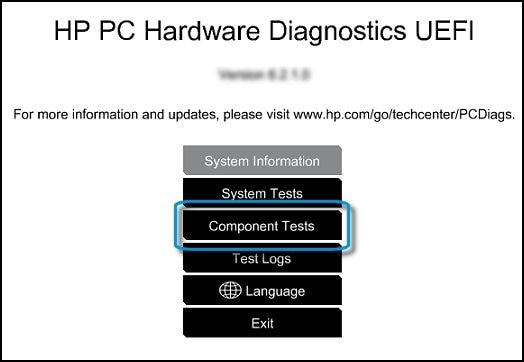
When the HP PC Hardware Diagnostics menu displays, click Component Tests.
-
In the Component Tests menu, click Hard Drive.
-
Click Quick Test.
-
Click Run once. If the computer has more than one hard drive, click Test All Hard Drives.
The Quick Test begins.

-
If the computer has more than one hard drive, select the drive you want to test. To test all the hard drives, select Test All Hard Drives.
When a test is complete, the results display on the screen. Test results are also available in the Test Logs on the main menu.
-
If the hard drive passes the Quick Test, but a problem still exists with the hard drive, run the Extensive Test. This test includes the SMART Check, Short DST, Optimized DST, and Long DST.
You can refer to this Link: https://support.hp.com/rs-en/document/c01443463
Keep me posted how it goes 😊
If the information I've provided was helpful, give us some reinforcement by clicking the "Solution Accepted" on this Post and it will also help other community members with similar issue.
KrazyToad
I Am An HP Employee
This topic has been archived. Information and links in this thread may no longer be available or relevant. If you have a question create a new topic by clicking here and select the appropriate board.
† The opinions expressed above are the personal opinions of the authors, not of HP. By using this site, you accept the Terms of Use and Rules of Participation.


Didn't find what you were looking for?
Ask the community
† The opinions expressed above are the personal opinions of the authors, not of HP. By using this site, you accept the <a href="https://www8.hp.com/us/en/terms-of-use.html" class="udrlinesmall">Terms of Use</a> and <a href="/t5/custom/page/page-id/hp.rulespage" class="udrlinesmall"> Rules of Participation</a>.