
-
×InformationNeed Windows 11 help?Check documents on compatibility, FAQs, upgrade information and available fixes.
Windows 11 Support Center. -
-
×InformationNeed Windows 11 help?Check documents on compatibility, FAQs, upgrade information and available fixes.
Windows 11 Support Center. -
- HP Community
- Notebooks
- Notebook Software and How To Questions
- How to boot from USB flash drive?/HP Spectre x360

Create an account on the HP Community to personalize your profile and ask a question
Your account also allows you to connect with HP support faster, access a personal dashboard to manage all of your devices in one place, view warranty information, case status and more.
Check out our WINDOWS 11 Support Center info about: OPTIMIZATION, KNOWN ISSUES, FAQs, VIDEOS AND MORE.

It has been a while since anyone has replied. Simply ask a new question if you would like to start the discussion again.

05-21-2015 07:33 AM
 HP Recommended
Product: HP Spectre x360 - 13-4003dx
Operating System: Microsoft Windows 8.1 (64-bit)
Hi all, I'm trying to figure out how to boot from the Acronis bootable USB flash drive in my HP Spectre x360. I place the USB flash drive in the USB port, I reboot and press ESC+F9, but the USB flash drive does not show in the boot options and the laptop boots directly into windows. Can someone explain what is the procedure to be able to boot from a bootable USB flash drive in this laptop? Thanks
Solved! Go to Solution.
1 ACCEPTED SOLUTION
Accepted Solutions


05-23-2022 06:04 AM
HP Recommended
Hi Community!
Here's a link that might help:
Notebook computers (Windows 😎
Learn how to perform a system recovery on your HP Notebook computer with Windows 8 using a USB flash drive.
NOTE:Back up all personal files and read all caution statements before performing a system recovery.
Recovery from a USB flash drive for your HP notebook computer (Windows 😎
Perform the following steps to recover the computer using a USB flash drive.
NOTE:For more information about saving a recovery image to a USB flash drive, see Creating Recovery Discs or Saving a Recovery Image to a USB Flash Drive (Windows 😎.
-
Turn on the computer, and insert the USB flash drive into a USB port.
-
Press and hold the power button turn off the computer.
-
Disconnect all connected devices and cables such as Personal Media Drives, printers, and faxes. Remove media from internal drives, and remove any recently added internal hardware. Do not disconnect the monitor, keyboard, mouse, USB recovery flash drive, or power cord.
-
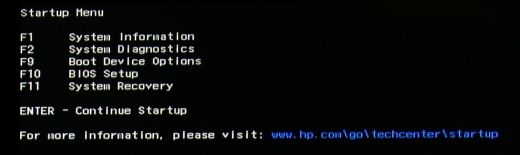
Immediately press the Escape key repeatedly, about once every second, until the Startup Menu opens.
-
Press F9 to open the Boot Device Options menu.
-
Use the up or down arrow key to select the USB flash drive, and then press Enter.
NOTE:
If you cannot select the USB flash drive from the Boot Menu, disable Secure Boot and enable Legacy Mode in BIOS. For detailed instructions, see the Disabling Secure Boot on a notebook computer (Windows 😎 section in this document. -
A window might display, prompting you to choose whether to run Recovery Manager from the hard disk or from the USB drive inserted. If this window displays, select Run program from media, and then click Next.
-
Follow the on-screen instructions to back up your data and recover your computer.
-
Once the recovery and setup are complete, turn off the computer, reconnect all devices and cables, and then turn on the computer.
-
Before using the computer, update and protect your computer. Reinstall any virus and security software that was installed before the system recovery.
-
Reinstall any software programs that were added after purchasing the computer, as well as any files that were backed up.
JessikaV
HP Support Community Administrator
I work on behalf of HP

4 REPLIES 4

05-21-2015 07:54 AM
HP Recommended
You must have secure boot enabled in the BIOS
Press F10 at the HP startup logo
enter BIOS
go to advanced/system configuration and look for this
Sometimes it is in the boot options
Disable Secure boot and check if the F9 menu can find your USB flash Drive
Another additional thing that you may have to do is to enable legacy mode if the BIOS allows/has this option.

I'm an HP Employee.The opinions expressed here are my personal opinions, not of HP.
Click on Thumbs up if my post helped you.Make it easier for other people to find solutions, by marking an answer “Accept as Solution” if it solves your problem.
05-21-2015 08:00 AM
HP Recommended
Hello Casiopeia
Welcome and Thank You for posting your query on HP Support Forum.
As I understand you want to boot from a USB flash drive. To achieve this you will need to check if USB Disk is set as first boot device.
To do that please follow the steps below
1. Shutdown the PC
2. Press the Power button and keep tapping F10
3. You will get to the BIOS screen
4. Navigate to "System Configuration"
5. Click on Boot Options
6. In UEFI Boot order please move the "USB Diskette" option to topmost in the list
7. Press F10 and save changes and Exit
8. Let the Unit restart and if the USB is plugged in it should boot from the USB automatically without any user intervention
Please even check that the USB Key you are using is a Bootable USB by trying the same on a different unit
Hope this helps, for any further queries reply to the post and feel free to join us again
**Click the KUDOS/Thumbs Up button to say Thanks**
Make it easier for other people to find solutions by marking a Reply 'Accept as Solution' if it solves your problem.
Thank You
Abhinab_Assists
05-21-2015 12:26 PM - edited 05-21-2015 12:42 PM
HP Recommended
Thanks for your replies, but unfortunately nothing works. Let me give you the facts:
- I have a bootable USB flash drive, in my PC that has Win 8.1x64 when I press F8 during POST the Boot Menu appears and shows the USB flash drive as an option, when I choose it, it boots perfectly fine from it and shows the Acronis menu.
- In my HP Spectrex360 I set the BIOS options as suggested: Secure Boot disabled, Legacy Support enabled and both UEFI and Legacy boot sequence is set with "USB diskette" in 1st place.
- I plugged the bootable USB flash drive in one of the USB ports of the laptop, power it on, press ESC, then press F9 and I'm directed to the Boot Menu. It does not show the USB flash drive as a boot option, it only shows the following: "Boot from EFI file" and "Notebook Hard Drive".
- I tried the above procedure plugging the bootable USB flash drive in all 3 USB ports of the HP Spectre x360 unsuccessfully.
If instead I try this procedure , the USB flash drive will show as "UEFI USB", if I select it, the laptop restarts and in POST it displays a message "Unable to boot from selected device. Press ENTER to continue", when I do so it redirects to the Boot Manager with the above mentioned boot options.
Any hint? Thanks
05-23-2022 06:04 AM
HP Recommended
Hi Community!
Here's a link that might help:
Notebook computers (Windows 😎
Learn how to perform a system recovery on your HP Notebook computer with Windows 8 using a USB flash drive.
NOTE:Back up all personal files and read all caution statements before performing a system recovery.
Recovery from a USB flash drive for your HP notebook computer (Windows 😎
Perform the following steps to recover the computer using a USB flash drive.
NOTE:For more information about saving a recovery image to a USB flash drive, see Creating Recovery Discs or Saving a Recovery Image to a USB Flash Drive (Windows 😎.
-
Turn on the computer, and insert the USB flash drive into a USB port.
-
Press and hold the power button turn off the computer.
-
Disconnect all connected devices and cables such as Personal Media Drives, printers, and faxes. Remove media from internal drives, and remove any recently added internal hardware. Do not disconnect the monitor, keyboard, mouse, USB recovery flash drive, or power cord.
-
Immediately press the Escape key repeatedly, about once every second, until the Startup Menu opens.
-
Press F9 to open the Boot Device Options menu.
-
Use the up or down arrow key to select the USB flash drive, and then press Enter.
NOTE:
If you cannot select the USB flash drive from the Boot Menu, disable Secure Boot and enable Legacy Mode in BIOS. For detailed instructions, see the Disabling Secure Boot on a notebook computer (Windows 😎 section in this document. -
A window might display, prompting you to choose whether to run Recovery Manager from the hard disk or from the USB drive inserted. If this window displays, select Run program from media, and then click Next.
-
Follow the on-screen instructions to back up your data and recover your computer.
-
Once the recovery and setup are complete, turn off the computer, reconnect all devices and cables, and then turn on the computer.
-
Before using the computer, update and protect your computer. Reinstall any virus and security software that was installed before the system recovery.
-
Reinstall any software programs that were added after purchasing the computer, as well as any files that were backed up.
JessikaV
HP Support Community Administrator
I work on behalf of HP

Be alert for scammers posting fake support phone numbers and/or email addresses on the community.
If you think you have received a fake HP Support message, please report it to us by clicking on "Flag Post".
† The opinions expressed above are the personal opinions of the authors, not of HP. By using this site, you accept the Terms of Use and Rules of Participation.


Didn't find what you were looking for?
Ask the community
† The opinions expressed above are the personal opinions of the authors, not of HP. By using this site, you accept the <a href="https://www8.hp.com/us/en/terms-of-use.html" class="udrlinesmall">Terms of Use</a> and <a href="/t5/custom/page/page-id/hp.rulespage" class="udrlinesmall"> Rules of Participation</a>.