• ×
    Information
    Need Windows 11 help?
    Check documents on compatibility, FAQs, upgrade information and available fixes.
    Windows 11 Support Center.
  • post a message
  • ×
    Information
    Need Windows 11 help?
    Check documents on compatibility, FAQs, upgrade information and available fixes.
    Windows 11 Support Center.
  • post a message
Guidelines
Seize the moment! nominate yourself or a tech enthusiast you admire & join the HP Community Experts!
Archived This topic has been archived. Information and links in this thread may no longer be available or relevant. If you have a question create a new topic by clicking here and select the appropriate board.

HP Recommended
HP Notebook - 15-da0014dx
Microsoft Windows 10 (64-bit)

It's the only thing keeping me from upgrading to windows 11.

4 REPLIES 4
HP Recommended

@Tripple_S 


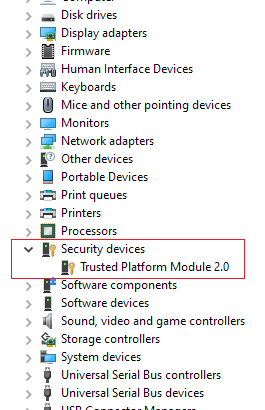
Your machine does have TPM 2.0 chip and it should be enabled in the US few years ago.  Please check Device Manager


         tpmd.png


Regards.

BH
***
**Click the KUDOS thumb up on the left to say 'Thanks'**
Make it easier for other people to find solutions by marking a Reply 'Accept as Solution' if it solves your problem.


HP Recommended

Weird I had to go to device manager and manually install it using the "add legacy hardware" action. I don't remember ever uninstalling it. But at least it's fixed and I can finally upgrade my laptop to windows 11.

HP Recommended

Never mind windows keeps removing it. Do you know where I can find the driver for it so I can Install it normally and see if windows likes it installed that way.

HP Recommended

Oh wait I found it I didn't have the device manager set to show hidden devices. Problem is though the windows 11 installer still does not see it.

Archived This topic has been archived. Information and links in this thread may no longer be available or relevant. If you have a question create a new topic by clicking here and select the appropriate board.
† The opinions expressed above are the personal opinions of the authors, not of HP. By using this site, you accept the <a href="https://www8.hp.com/us/en/terms-of-use.html" class="udrlinesmall">Terms of Use</a> and <a href="/t5/custom/page/page-id/hp.rulespage" class="udrlinesmall"> Rules of Participation</a>.