• ×
    Information
    Need Windows 11 help?
    Check documents on compatibility, FAQs, upgrade information and available fixes.
    Windows 11 Support Center.
  • post a message
  • ×
    Information
    Need Windows 11 help?
    Check documents on compatibility, FAQs, upgrade information and available fixes.
    Windows 11 Support Center.
  • post a message
Guidelines
Seize the moment! nominate yourself or a tech enthusiast you admire & join the HP Community Experts!
Archived This topic has been archived. Information and links in this thread may no longer be available or relevant. If you have a question create a new topic by clicking here and select the appropriate board.

HP Recommended
HP Pavilion x360 14-cd1055cl
Microsoft Windows 10 (64-bit)

I replaced the battery and now my keyboard does not work on my laptop after I put it back together.  

1 REPLY 1
HP Recommended

@edwardme ,


All right, let's try this first: shut down your laptop, remove the battery, then plug in the power cable. Try to boot the laptop without the battery installed, using AC power only.


If the keyboard works when the battery is removed, there may be an issue with your battery.  If you (replaced) the original HP battery with a generic one (?), that could be a malfunction cause.  However, there are a couple of troubleshooting steps I would try first.


Second, try plugging in another (USB-connected) keyboard and mouse that you know are in working order. If the problem persists, then something is wrong with your laptop and it should be serviced by a local PC repair shop.


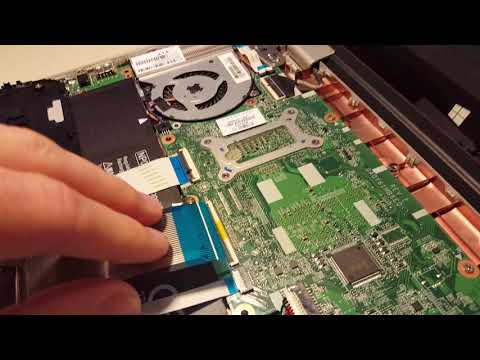
Thirdly, a number of x360 Users have reported that sometimes the keyboard loses connection with the laptop's motherboard and you have a keyboard that either works intermittently or not at all. If you are computer savvy, remove the outer case and reconnect the ribbon cable on the bottom of the keyboard.  Interestingly, take a look at this YouTube video from an individual who is/was struggling with the same issue you have.


Please pay close attention to the feedback responses below the video.  Perhaps one of the proposed solutions may be applicable to you: https://www.youtube.com/watch?v=dVh_zKA4vc4.


Hope this helps.


Kind Regards,


NonSequitur777


I can not secure the Keyboard Cable into the connector after doing a battery replacement on my laptop. PLEASE HELP!
Archived This topic has been archived. Information and links in this thread may no longer be available or relevant. If you have a question create a new topic by clicking here and select the appropriate board.
† The opinions expressed above are the personal opinions of the authors, not of HP. By using this site, you accept the <a href="https://www8.hp.com/us/en/terms-of-use.html" class="udrlinesmall">Terms of Use</a> and <a href="/t5/custom/page/page-id/hp.rulespage" class="udrlinesmall"> Rules of Participation</a>.