• ×
    Information
    Need Windows 11 help?
    Check documents on compatibility, FAQs, upgrade information and available fixes.
    Windows 11 Support Center.
  • post a message
  • ×
    Information
    Need Windows 11 help?
    Check documents on compatibility, FAQs, upgrade information and available fixes.
    Windows 11 Support Center.
  • post a message
Guidelines
Seize the moment! nominate yourself or a tech enthusiast you admire & join the HP Community Experts!
Archived This topic has been archived. Information and links in this thread may no longer be available or relevant. If you have a question create a new topic by clicking here and select the appropriate board.

HP Recommended
HP Spectre x360 Convertible Laptop PC 14-ea1000 (446B8AV)
Microsoft Windows 11

Two weeks ago I bought an HP Spectre X360 14 (i7-1195G7, 16GB, 1TB Optane, with 3K x 4K display.) I upgraded the OS from Win11 Home to Win11 Pro (21H2.)


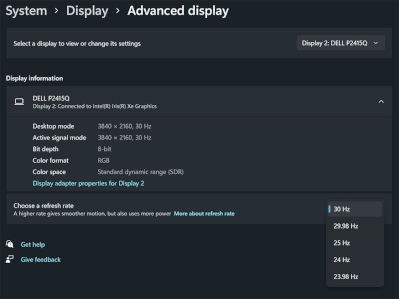
I also purchased an Anker USB-C hub with 4K/60Hz via HDMI  and an Insignia USB-C-to-DisplayPort Cable  that also supports 4K/60Hz. However using either one of them, I only get 30Hz on my Dell P2415Q 4K monitor. I've tried both TB4 ports on the HP.


HP Spectre DP 30Hz.gif


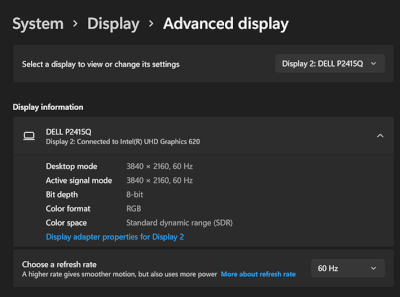
To eliminate the Dell monitor as the culprit, I connected a Microsoft Surface Pro 6 via DisplayPort, and sure enough, it shows 60Hz using the rather old Intel® UHD Graphics 620.

SP6-DP-60hz.gif

Where do I begin to troubleshoot this?

1 REPLY 1
HP Recommended

I just re-read my post and it might not be clear:  when I use the USB-C-to-Display Port cable, I do it from a TB4 port on the computer directly to a DP on the monitor – I'm not using the USB hub when I use that cable.


I only use the USB hub when I'm connecting to the monitor via HDMI, since the computer doesn't have any HDMI port.

Archived This topic has been archived. Information and links in this thread may no longer be available or relevant. If you have a question create a new topic by clicking here and select the appropriate board.
† The opinions expressed above are the personal opinions of the authors, not of HP. By using this site, you accept the <a href="https://www8.hp.com/us/en/terms-of-use.html" class="udrlinesmall">Terms of Use</a> and <a href="/t5/custom/page/page-id/hp.rulespage" class="udrlinesmall"> Rules of Participation</a>.