• ×
    Information
    Need Windows 11 help?
    Check documents on compatibility, FAQs, upgrade information and available fixes.
    Windows 11 Support Center.
  • post a message
  • ×
    Information
    Need Windows 11 help?
    Check documents on compatibility, FAQs, upgrade information and available fixes.
    Windows 11 Support Center.
  • post a message
Guidelines
Join the HP Community Solve‑a‑thon | Help Others & Share Your Solutions | Live on Zoom | 2:30 PM to 2:30 AM IST | Every Wednesday Click here to know more
Archived This topic has been archived. Information and links in this thread may no longer be available or relevant. If you have a question create a new topic by clicking here and select the appropriate board.

HP Recommended
HP Spectre x360 - 15-df0018ur
Microsoft Windows 10 (64-bit)

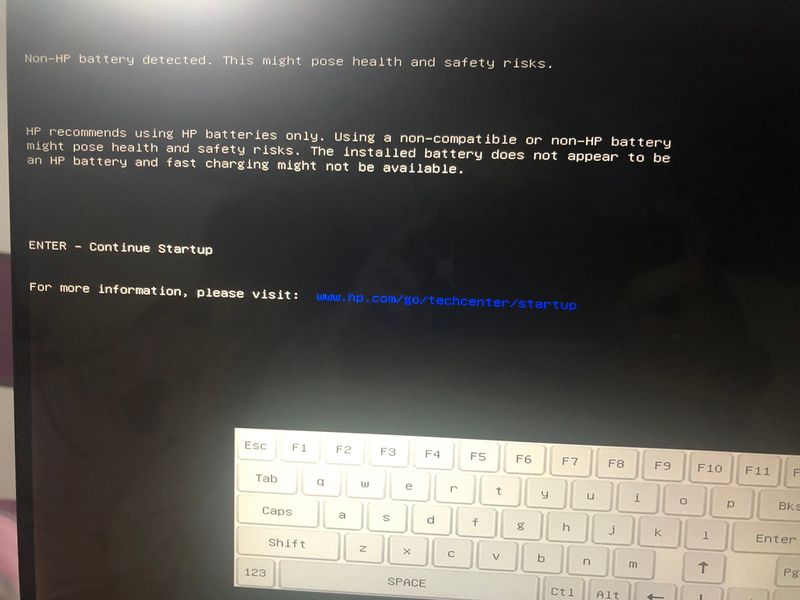
Suddenly my HP Spectre start to show this error when I start my laptop. What is this error and why it shows up? The laptop is one year old and never been opened. To be noted, this model has integrated battery. 

viber_image_2021-03-03_16-14-37.jpg 

3 REPLIES 3
HP Recommended

@PetarCukl

Thank you for posting on HP Support Community.
 

Don't worry as I'll be glad to help, I have a few troubleshooting steps we could try to fix the issue:  

  • 1. Go to Start, search for Device Manager, and open this result.
  • 2. Expand batteries.
  • 3. Right-click on the ACPI option (usually the 2nd option) and select delete or uninstall. Follow the prompts.
  • 4. Shut down the computer. 
  • 5. Disconnect the charger.
  • 6. Remove the battery.
  • 7. Hold down the power button for 1 minute.
  • 8. Insert the battery only.
  • 9. Attempt to turn the battery on.

Hope this helps! Keep me posted for further assistance.
Please click “
Accept as Solution” if you feel my post solved your issue, it will help others find the solution.

ECHO_LAKE
I am an HP Employee

HP Recommended

Thank you very much, but I can't accept your answer as a help for my problem because of point "6. Remove the battery".


The battery it's integrated, if I want to remove it I'll need to open/dissemble the computer and disconnect it from the component.


Please is there any other solution?

HP Recommended

@PetarCukl

Thank you for posting back. 


You can skip the step if your computer battery is sealed. 
Follow steps from the link to reset the non-removable battery: https://hp.care/2GnkMa8. (Refer to the removable and sealed battery)


Keep me posted for further assistance.
 

ECHO_LAKE
I am an HP Employee

Archived This topic has been archived. Information and links in this thread may no longer be available or relevant. If you have a question create a new topic by clicking here and select the appropriate board.
† The opinions expressed above are the personal opinions of the authors, not of HP. By using this site, you accept the <a href="https://www8.hp.com/us/en/terms-of-use.html" class="udrlinesmall">Terms of Use</a> and <a href="/t5/custom/page/page-id/hp.rulespage" class="udrlinesmall"> Rules of Participation</a>.