• ×
    Information
    Need Windows 11 help?
    Check documents on compatibility, FAQs, upgrade information and available fixes.
    Windows 11 Support Center.
  • post a message
  • ×
    Information
    Need Windows 11 help?
    Check documents on compatibility, FAQs, upgrade information and available fixes.
    Windows 11 Support Center.
  • post a message
Guidelines
Join the HP Community Solve‑a‑thon | Help Others & Share Your Solutions | Live on Zoom | 2:30 PM to 2:30 AM IST | Every Wednesday Click here to know more
Archived This topic has been archived. Information and links in this thread may no longer be available or relevant. If you have a question create a new topic by clicking here and select the appropriate board.

HP Recommended
HP 15-da0327tu
Microsoft Windows 10 (64-bit)

Hi.


I own HP 15-da0327tu.

Customer care told that this model is having a dedidacted SSD Slot.


What kind of M.2 SSD is suitable for my machine? M.2 SATA OR NVME else both are fine ?

What is the maximum M.2 SATA capacity of dedicated ssd slot ? I have gone through the manual but it confuses me.


Haivng a dedicated slot, we still need to remove Hard Drive and CD Drive before inserting SSD? ( Manual says so)


Thanks.

1 REPLY 1
HP Recommended

@Lappi600,


Welcome to the HP Forums 🙂


I see from your post that you need information and assistance related to upgrade SSD on your HP 15 notebook. Don't worry we'll work together to help you find a solution.


I did go through the Product Specifications and found that your PC was shipped with 1 TB 5400 rpm SATA Hard drive on your PC.


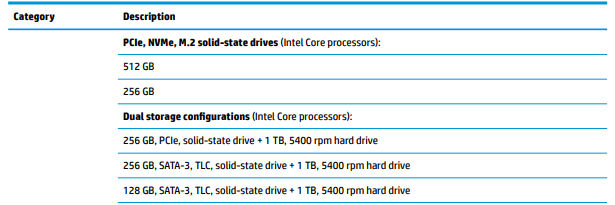
Please go through the Maintenance and Service guide of your notebook and I see there is One M.2 slot for solid-state drive (Intel Core processors) here you will find the parts which are tested and compatible on your PC.


For the part numbers please go through the Chapter 3. Illustrated Parts Catalog - Page number 27.


Please note, these are the parts which are tested on your PC, If you wish to try other parts you can try it at your own discretion, HP Doesn't recommend any upgrade/downgrade of any hardware parts or software that is bundled with the product. It may affect the manufacturer's warranty and performance. 


Alternatively, You could replace the part on your own, use the HP Partsurfer to identify the part: Click here & order it via the HP Parts store (Click here).


Let me know if this helps!

Have a great day ahead! 🙂


If I have helped you resolve the issue, feel free to give me a virtual high-five by clicking the 'Thumbs Up' icon below,

Followed by clicking on "Accept as Solution" from the drop-down menu on the upper right corner.

Jeet_Singh
I am an HP Employee

Archived This topic has been archived. Information and links in this thread may no longer be available or relevant. If you have a question create a new topic by clicking here and select the appropriate board.
† The opinions expressed above are the personal opinions of the authors, not of HP. By using this site, you accept the <a href="https://www8.hp.com/us/en/terms-of-use.html" class="udrlinesmall">Terms of Use</a> and <a href="/t5/custom/page/page-id/hp.rulespage" class="udrlinesmall"> Rules of Participation</a>.