
-
×InformationNeed Windows 11 help?Check documents on compatibility, FAQs, upgrade information and available fixes.
Windows 11 Support Center. -
-
×InformationNeed Windows 11 help?Check documents on compatibility, FAQs, upgrade information and available fixes.
Windows 11 Support Center. -
- HP Community
- Archived Topics
- Notebooks Archive
- Which drivers to install

Create an account on the HP Community to personalize your profile and ask a question
Your account also allows you to connect with HP support faster, access a personal dashboard to manage all of your devices in one place, view warranty information, case status and more.
 This topic has been archived. Information and links in this thread may no longer be available or relevant. If you have a question create a new topic by clicking here and select the appropriate board.

03-02-2017 06:24 AM - edited 03-02-2017 06:26 AM
 HP Recommended
Product: HP 450 G4
Operating System: Microsoft Windows 10 (64-bit)
Good day,
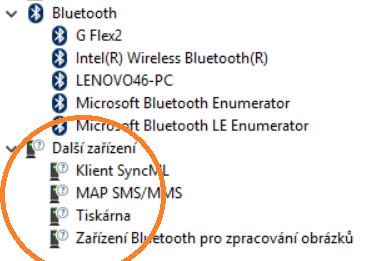
I have problem with some drivers. I installed everything drivers for my notebook. But after actualisation win 10 I have several question marks in device manager.
Here are detail informations:
1. Device BTHENUM\{00000002-0000-1000-8000-0002ee000002}_LOCALMFG&0002\7&21e8442f&0&402CF453D11E_C00000000
2. Device BTHENUM\{00001132-0000-1000-8000-00805f9b34fb}_VID&000100c4_PID&13a1\7&21e8442f&0&64BC0CF387DD_C00000000
3. Device BTHENUM\{00001304-0000-1000-8000-00805f9b34fb}_LOCALMFG&0002\7&21e8442f&0&402CF453D11E_C00000000
4. Device BTHENUM\{0000111b-0000-1000-8000-00805f9b34fb}_LOCALMFG&0002\7&21e8442f&0&402CF453D11E_C00000000
Which specific drivers I must install to resolve these problems? Bluetooth drivers I installed. Thanks a lot 🙂
6 REPLIES 6


03-02-2017 06:32 AM
HP Recommended
HI
You can find all the drivers for your PC in the link below
http://support.hp.com/in-en/drivers/selfservice/hp-probook-450-g4-notebook-pc/10477253
Install chipset & Graphics drivers from the link
& install HP Support Assistant from the link below
http://ftp.hp.com/pub/softpaq/sp77501-78000/sp77890.exe
& check for updates and run all of them
Hope this helps.
***** Click the Thumbs UP (Like) on the Right to say 'Thanks'*****
****Make it easier for other people to find solutions, by marking my answer “Accept as Solution”&"Thumbs up "if it solves your problem.****
-VJ
Although I am an HP Employee, I am speaking for myself and not for HP.
***** Click the Thumbs UP (Like) on the Right to say 'Thanks'*****
****Make it easier for other people to find solutions, by marking my answer “Accept as Solution”&"Thumbs up "if it solves your problem.****
-VJ
Although I am an HP Employee, I am speaking for myself and not for HP.

03-02-2017 07:54 AM
HP Recommended
I connect via bluetooth my phone only...and install these drivers from driver - network from here http://support.hp.com/in-en/drivers/selfservice/hp-probook-450-g4-notebook-pc/10477253
 This topic has been archived. Information and links in this thread may no longer be available or relevant. If you have a question create a new topic by clicking here and select the appropriate board.
† The opinions expressed above are the personal opinions of the authors, not of HP. By using this site, you accept the Terms of Use and Rules of Participation.


Didn't find what you were looking for?
Ask the community
† The opinions expressed above are the personal opinions of the authors, not of HP. By using this site, you accept the <a href="https://www8.hp.com/us/en/terms-of-use.html" class="udrlinesmall">Terms of Use</a> and <a href="/t5/custom/page/page-id/hp.rulespage" class="udrlinesmall"> Rules of Participation</a>.