
-
×InformationNeed Windows 11 help?Check documents on compatibility, FAQs, upgrade information and available fixes.
Windows 11 Support Center. -
-
×InformationNeed Windows 11 help?Check documents on compatibility, FAQs, upgrade information and available fixes.
Windows 11 Support Center. -
- HP Community
- Archived Topics
- Notebooks Archive
- ps/2 compatible mouse

Create an account on the HP Community to personalize your profile and ask a question
Your account also allows you to connect with HP support faster, access a personal dashboard to manage all of your devices in one place, view warranty information, case status and more.
 This topic has been archived. Information and links in this thread may no longer be available or relevant. If you have a question create a new topic by clicking here and select the appropriate board.

09-28-2012 12:38 PM
 HP Recommended
hi,
kindly help me.
i have HP Pavilion dv6-2138ca Entertainment Notebook PC and windows 7. my mouse"s scroll is not working. In device manager I have ps/2 compatible mouse, when i try to install synaptics recommended version 14.0.0.3 A it says installation status failed due to error. I had synaptics version 14.0.0.3 so when i came to update that it said out of dated so i uninstalled it from programs, then I just saw in device manager ps/2 compatible mouse instead of synaptics, when i updated ps/2 compatible mouse it says this is up to date but i mouse properties the device settings tab disappears and scroll is not functioning. May i uninstall ps/2 compatible mouse and if incase i uninstalled it then how many chances are there for me to install synaptics recommended versio 14.0.0.3. or is this possible uninstalling ps/2 compatible mouse will not create any problems like mouse is not working etc.
Simply, i want toa ask you that can i uninstall ps/2 compatible mouse and install synaptics for making scroll works . Thanks
Solved! Go to Solution.
1 ACCEPTED SOLUTION
Accepted Solutions


09-28-2012 12:51 PM
HP Recommended
Hi,
I believe you need something like this:
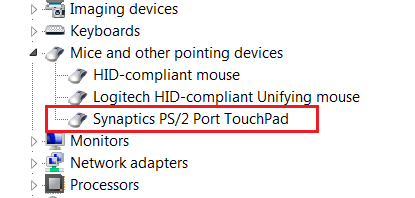
You may want to try this version which is - 16.0.1.0:
ftp://ftp.hp.com/pub/softpaq/sp56501-57000/sp56713.exe
before installing it first completely uninstall the current version you have installed
Good luck.
BH
***
**Click the KUDOS thumb up on the left to say 'Thanks'**
Make it easier for other people to find solutions by marking a Reply 'Accept as Solution' if it solves your problem.


***
**Click the KUDOS thumb up on the left to say 'Thanks'**
Make it easier for other people to find solutions by marking a Reply 'Accept as Solution' if it solves your problem.
6 REPLIES 6
09-28-2012 12:51 PM
HP Recommended
Hi,
I believe you need something like this:
You may want to try this version which is - 16.0.1.0:
ftp://ftp.hp.com/pub/softpaq/sp56501-57000/sp56713.exe
before installing it first completely uninstall the current version you have installed
Good luck.
BH
***
**Click the KUDOS thumb up on the left to say 'Thanks'**
Make it easier for other people to find solutions by marking a Reply 'Accept as Solution' if it solves your problem.
***
**Click the KUDOS thumb up on the left to say 'Thanks'**
Make it easier for other people to find solutions by marking a Reply 'Accept as Solution' if it solves your problem.
09-28-2012 02:00 PM
HP Recommended
hi,
by using above process without uninstalling or disabling the ps/2 compatible mouse ifound that
device updated but installation failed.changes occurs if i will restart and again the same situation as it was before no solution to this.
kindly help me to get rid of this bad situation/
thanks
This topic has been archived. Information and links in this thread may no longer be available or relevant. If you have a question create a new topic by clicking here and select the appropriate board.
† The opinions expressed above are the personal opinions of the authors, not of HP. By using this site, you accept the Terms of Use and Rules of Participation.


Didn't find what you were looking for?
Ask the community
† The opinions expressed above are the personal opinions of the authors, not of HP. By using this site, you accept the <a href="https://www8.hp.com/us/en/terms-of-use.html" class="udrlinesmall">Terms of Use</a> and <a href="/t5/custom/page/page-id/hp.rulespage" class="udrlinesmall"> Rules of Participation</a>.