
-
×InformationNeed Windows 11 help?Check documents on compatibility, FAQs, upgrade information and available fixes.
Windows 11 Support Center. -
-
×InformationNeed Windows 11 help?Check documents on compatibility, FAQs, upgrade information and available fixes.
Windows 11 Support Center. -
- HP Community
- Printers
- Printer Paper Jams & Feed Issues
- Re: Printer paper jam?

Create an account on the HP Community to personalize your profile and ask a question
Your account also allows you to connect with HP support faster, access a personal dashboard to manage all of your devices in one place, view warranty information, case status and more.

It has been a while since anyone has replied. Simply ask a new question if you would like to start the discussion again.

05-05-2021 03:24 AM
 HP Recommended
I have pretty much the same issue. I have a 6950 that I use regularly, but rarely. Maybe I print a few sheets per week. All of a sudden I keep getting "paper jam" notices when there is no jam. I keep getting error messages that go around in circles: "turn off the printer using the power button", but it won't turn off. So I unplug and re-plug, and the first message I get is that I wasn't supposed to unplug, I was supposed to turn off with the power button.... Then its giving me error 0x61000048, and when I google that, it says to do what I've been doing - power off, power on, clear jammed paper (except there is none). The only weird thing is that when I try to send a document to print, I sometimes get the sound of gears stripping. Not a good sound, but I have no idea why. I'm about to dump the printer and switch to another brand. Any suggestions? I can't keep going to Fedex to do my one or two sheets of paper printing jobs. Thanks.
9 REPLIES 9


05-09-2021 11:57 PM
HP Recommended
Welcome to HP Support Community
I would like to help
Please follow the instructions in Step 3 from this Link: https://support.hp.com/in-en/document/c05079673 to clean the paper feed rollers
Thank you
If the information I've provided was helpful, give us some reinforcement by clicking the "Solution Accepted" on this Post and it will also help other community members with similar issue.
KrazyToad
I Am An HP Employee
05-10-2021 12:50 AM
HP Recommended
Did all those things, nothing worked, until all of a sudden it did. I kept getting false paper jams. The error messages went around in circles - it told me to unplug the printer with the power on, then when I plugged it in it gave me an error message telling me next time I should power off before unplugging. It makes no sense. There should be instructions on how to dismantle the roller system to clean it. Not sure what I did, but its working again, for now.
05-11-2021 06:59 AM
HP Recommended
I'm glad you got this sorted out
Drop us a message anytime you need help
If the information I've provided was helpful, give us some reinforcement by clicking the "Solution Accepted" on this Post and it will also help other community members with similar issue.
KrazyToad
I Am An HP Employee

05-11-2021 07:37 AM
HP Recommended
I got the same problem on officejet 7612 checked every where there is no papers any where last night I resetted the printer and now it shows only 3 icons on screen Product Tour, APPS and ePrint and the return arrow is highlighted. If I press that the screen change to
Setup
To set up the printer and connect to the network touch Continue. If i touch continue it goes back to intiatilize again
Te view the features available on the printer, touch View demo and then it returns to the three icons
Please help to get it back to the home screen
05-12-2021 07:35 AM
HP Recommended
I have sent you a private message. Please check your Inbox
Thank you
If the information I've provided was helpful, give us some reinforcement by clicking the "Solution Accepted" on this Post and it will also help other community members with similar issue.
KrazyToad
I Am An HP Employee
05-13-2021 07:50 AM
HP Recommended
Please follow the instructions in this Link: https://support.hp.com/in-en/document/c00909241 and let me know how it goes
KrazyToad
I Am An HP Employee
05-13-2021 09:45 AM
HP Recommended
Tried all that at moment it starts up with a setup screen
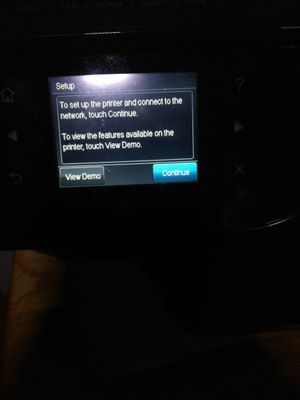
if I press the left demo key then it change to this screen
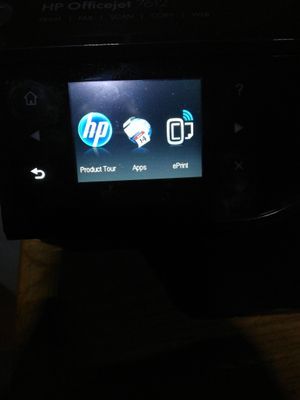
and if I press continue then it goes into a Initializing setup and then back to the three icon screen that happens all day long. I tried with a lancable plugged in but still no joy also tried with a USB cable to PC and still nothing tries a Full reset nothibg tried a parties reset nothing and tried the semi reset also nothing keep on coming back to the three icon screen
05-15-2021 08:12 AM
HP Recommended
If you were unable to perform the Semi Full Reset, try downloading the printer Firmware https://support.hp.com/us-en/document/ish_1776648-1643972-16
If the issue persists please contact HP Support in your region for service options
1) Click on this link - www.hp.com/contacthp/
2) Select your product type below.
3) Enter the serial of your device.
4) Select the country from the drop-down.
5) Select the chat or get phone number options based on your preferences.
6) Fill the web-form and proceed further.
Thank you
KrazyToad
I Am An HP Employee

Be alert for scammers posting fake support phone numbers and/or email addresses on the community.
If you think you have received a fake HP Support message, please report it to us by clicking on "Flag Post".
† The opinions expressed above are the personal opinions of the authors, not of HP. By using this site, you accept the Terms of Use and Rules of Participation.


Didn't find what you were looking for?
Ask the community
† The opinions expressed above are the personal opinions of the authors, not of HP. By using this site, you accept the <a href="https://www8.hp.com/us/en/terms-of-use.html" class="udrlinesmall">Terms of Use</a> and <a href="/t5/custom/page/page-id/hp.rulespage" class="udrlinesmall"> Rules of Participation</a>.