
-
×InformationNeed Windows 11 help?Check documents on compatibility, FAQs, upgrade information and available fixes.
Windows 11 Support Center. -
-
×InformationNeed Windows 11 help?Check documents on compatibility, FAQs, upgrade information and available fixes.
Windows 11 Support Center. -
- HP Community
- Archived Topics
- Printers Archive
- Re: Retracting the output tray extender

Create an account on the HP Community to personalize your profile and ask a question
Your account also allows you to connect with HP support faster, access a personal dashboard to manage all of your devices in one place, view warranty information, case status and more.
 This topic has been archived. Information and links in this thread may no longer be available or relevant. If you have a question create a new topic by clicking here and select the appropriate board.

7 REPLIES 7


10-24-2022 07:29 PM
 HP Recommended
Hi,
Thanks for using the HP Support Community.
Simply push back the tray extender back to it's original position.
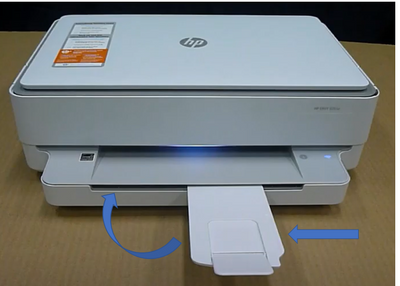
For more resources on this printer:
https://www.youtube.com/playlist?list=PLUV0sXfF6zPh6CvwM2cDtFruOzbfD2fEk
Hope that helps!
I am an HP Employee. Although I am speaking for myself and not for HP.
Click Helpful = Yes to say Thank You.
Question / Concern Answered, Click "Accept as Solution"

Click Helpful = Yes to say Thank You.
Question / Concern Answered, Click "Accept as Solution"
10-25-2022 06:47 AM
HP Recommended
Hi @truebill
If the extender is jammed, then suggest to contact support for a printer replacement if the product is still under warranty.
https://support.hp.com/us-en/checkwarranty
http://www8.hp.com/us/en/contact-hp/ww-phone-assist.html
Hope that helps!
I am an HP Employee. Although I am speaking for myself and not for HP.
Click Helpful = Yes to say Thank You.
Question / Concern Answered, Click "Accept as Solution"
Click Helpful = Yes to say Thank You.
Question / Concern Answered, Click "Accept as Solution"
10-25-2022 12:27 PM
HP Recommended
Totally unhelpful. It's not in warranty, and to replace a whole printer because of a little plastic extender jam would be a waste. If it's jammed, and I'm not sure it's jammed or designed this way with a trick way of retracting it, there should be a way to unjam it.
10-26-2022 12:14 AM - edited 10-26-2022 06:46 PM
HP Recommended
HI,
Took a look at the printer tray extender and realised it can be tight.
Try to spray a little WD-40 on the area shown (picture with tray extender pulled out)
View is under the tray extender, spray WD-40 where the round hinge is.
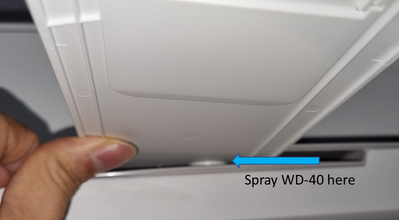
Then try to move the tray extender again.
Once it moves, do that several times to "loosen" it, hopefully that will help.
Thanks,
I am an HP Employee. Although I am speaking for myself and not for HP.
Click Helpful = Yes to say Thank You.
Question / Concern Answered, Click "Accept as Solution"
Click Helpful = Yes to say Thank You.
Question / Concern Answered, Click "Accept as Solution"

10-26-2022 12:47 AM
HP Recommended
Hi @truebill ,
Please follow advice from expert @greenturtle
And then check the next video also:
https://www.youtube.com/watch?v=w6wyr4Ev4Ag&ab_channel=Simplesolution
* Click on YES button to say thanks,
* Click on the button Accepted Solution if the question is answered.
Best regards,
ferRX.

@ferRX / I am a volunteer posting answers.

Mostly all the HP printers have this same problem... But Don't panic... it can be easily fixed.....
This topic has been archived. Information and links in this thread may no longer be available or relevant. If you have a question create a new topic by clicking here and select the appropriate board.
† The opinions expressed above are the personal opinions of the authors, not of HP. By using this site, you accept the Terms of Use and Rules of Participation.


Didn't find what you were looking for?
Ask the community
† The opinions expressed above are the personal opinions of the authors, not of HP. By using this site, you accept the <a href="https://www8.hp.com/us/en/terms-of-use.html" class="udrlinesmall">Terms of Use</a> and <a href="/t5/custom/page/page-id/hp.rulespage" class="udrlinesmall"> Rules of Participation</a>.