• ×
    Information
    Need Windows 11 help?
    Check documents on compatibility, FAQs, upgrade information and available fixes.
    Windows 11 Support Center.
  • post a message
  • ×
    Information
    Need Windows 11 help?
    Check documents on compatibility, FAQs, upgrade information and available fixes.
    Windows 11 Support Center.
  • post a message
Guidelines
Seize the moment! nominate yourself or a tech enthusiast you admire & join the HP Community Experts!
Archived This topic has been archived. Information and links in this thread may no longer be available or relevant. If you have a question create a new topic by clicking here and select the appropriate board.

HP Recommended
HP LaserJet Pro P1102 Printer

i need to install hp laserjet p1102 drivers. The drivers available on the site are not the correct ones.

3 REPLIES 3
HP Recommended


          Hello @ANDREAFer,


Here is the link where is, driver and firmware:


https://support.hp.com/gb-en/drivers/selfservice/hp-laserjet-pro-p1102-printer-series/4110394

Download this one:

50157037_1157.4 MBJul 29, 2021Download


To uninstall the old driver and clean up your printer names in


Program and Program(X86);


The problem comes from the old driver. It did not install all printer operation menus. You will have to uninstall the old driver with the procedure that I recommend, without using any software specific, for uninstallation, only follow the procedure. Then install the new full HP driver attached below:


You have to uninstall the old driver in the Windows Control Panel, in "Programs and Features", then right click on the printer line, "remove".

Delete all occurrences that you will find in: Program and Program X86, then, in the Control Panel, right click on your old printer (If it is still there, chances are it is no longer there) the "Remove" if it is present.

Restart the PC. Connect the printer to the power supply, turn it on, then connect a USB cord 1) on the PC side,     2) on the printer you

Connect to USB, during installation ONLY when prompted.( Towards the end of the installation).

Start installing your printer, by right-clicking on the Setup. driver exe installed, installed ''en

as administrator'', let the printer install itself, at the end, restart the PC.

To create a shortcut on the Windows desktop, (to have access to your printer), open the Windows Control Panel, right click on the icon of your

new printer, create a shortcut, yes, on the desktop.

A new shortcut has been created on the Windows desktop.

Open the Windows desktop, left-click on the new shortcut that has been created,

A printer menu appears (See below) with "ink levels", possibility : print, scan, fax, numériser.

If it works, you can delete the old shortcut on the Windows desktop.


Bernard42_0-1678813496243.jpeg


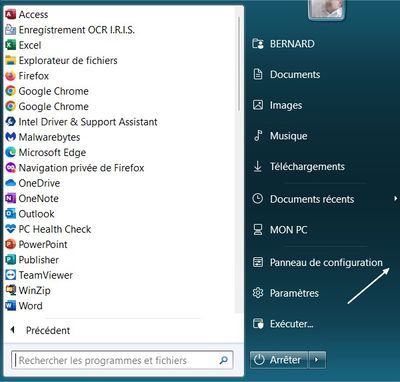
Here's how to access the Control Panel, for those they don't have the shortcut :


Bernard42_1-1678813496248.jpeg


*Turn on your printer, print a test page, by clicking on "Customize your Printer",

''Print a test page''.

That's it, your printer is working again.


              * Click on YES button  to say thanks, 

              * Click on the button Accepted Solution if the question is answered.

              *    Please contact me to inform me of the result


                   Best regards,


Bernard42.
HP Recommended

thanks for your suggestion but in the drivers link, the printer model is not present. Therefore, it does not recognize any printer

HP Recommended


    Hello @ANDREAFer,


This link is suitable for your printer!

The relevant link is this:

50157037_1157.4 MBJul 29, 2021Download


Download and install it, it will work.


  • Click on yes button to say thanks
  • Click on the button Accepted Solution if the question is answered
  • Please contact me to inform me of the resullt


             Best regards,


Bernard42.
Archived This topic has been archived. Information and links in this thread may no longer be available or relevant. If you have a question create a new topic by clicking here and select the appropriate board.
† The opinions expressed above are the personal opinions of the authors, not of HP. By using this site, you accept the <a href="https://www8.hp.com/us/en/terms-of-use.html" class="udrlinesmall">Terms of Use</a> and <a href="/t5/custom/page/page-id/hp.rulespage" class="udrlinesmall"> Rules of Participation</a>.