• ×
    Information
    Need Windows 11 help?
    Check documents on compatibility, FAQs, upgrade information and available fixes.
    Windows 11 Support Center.
  • post a message
  • ×
    Information
    Need Windows 11 help?
    Check documents on compatibility, FAQs, upgrade information and available fixes.
    Windows 11 Support Center.
  • post a message
Guidelines
Seize the moment! nominate yourself or a tech enthusiast you admire & join the HP Community Experts!
Archived This topic has been archived. Information and links in this thread may no longer be available or relevant. If you have a question create a new topic by clicking here and select the appropriate board.

HP Recommended
macOS 12.0 Monterey

For some reason I cannot install HP Easy Start on MacBook Pro 2021 (M1 Pro). The install runs as it should, but after "add and check" (Change to HP Driver) it hangs. There might be an issue with the "new" M1 Pro? But actually it doesn't ask for Rosetta 2? Any suggestions?

4 REPLIES 4
HP Recommended

OK, I have just found the following entry in the "HP Easy Start.log":


"2022-2-27 21:4:8 GMT 1.0 <Warning>: [OSPConnectToDeviceController] - The device is scan capable but queue is created without scan support or AirScan doen not supported by the target system"


That actually doesn't seem to be good. I also found out that printing is possible, but scanning doesn't seem to work. Is there any workaround?

HP Recommended

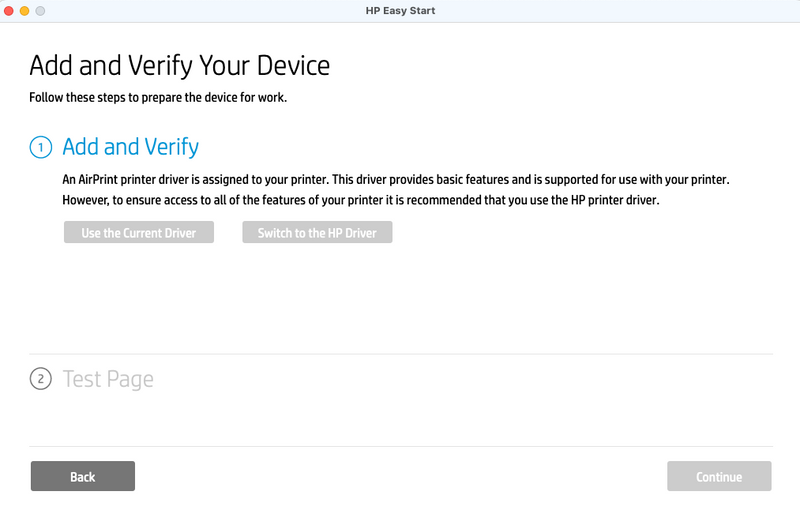
Same issue here: Installing of "HP Easy Start" is stopping in step "Add and Verify" when "Switch to the HP Driver" is selected.

Same entry in log-file.

My setup/configuration:

- HP M480f-printer

- macOS 12.3 w/ M1-Apple Silicon


Did you made any progress in resolving the issue?


HP Recommended

Yes, I finally made it. You need to enable "Full Disk Access" in the "Security & Privacy" Section of the System Preferences. There is no hint during installing so it took me some time to find out. I'm not quite sure that this was it, so maybe you also need to allow HP Easy Start to access "Files and Folders" (in the same section of System Preferences). Let me know if you were successful.


Image 4-2-22 at 7.12 PM.jpeg

HP Recommended

In my case "HP Easy Start" is also added to "Files and Folders" and "Full Disk Access".

Unfortunately behaviour is still the same.


I have also checked "HP Easy Start.log":

The download of hp-printer-essentials-UniPS-6_0_0_6.pkg is successfully completed but the next steps are showing a few errors:


2022-4-3 11:13:29 GMT 2.0 <Info>: [OSPInstallerOutputReader] - Completed successfully
2022-4-3 11:13:41 GMT 2.0 <Info>: [OSPDeviceQueueProcessor] - Start obtaining required information for queue creation.
2022-4-3 11:13:41 GMT 2.0 <Info>: [OSPDeviceQueueCreator] - Creating queue for: HP Color LaserJet MFP M480
2022-4-3 11:13:41 GMT 2.0 <Info>: [OSPDeviceQueuePPDProvider] - Start fetching PPDs
2022-4-3 11:13:41 GMT 2.0 <Error>: [OSPDeviceQueuePPDProvider] - Running auto setup tool
2022-4-3 11:13:41 GMT 2.0 <Info>: [OSPAutoSetupToolPPDProcessor] - Start processing PPD
2022-4-3 11:13:41 GMT 2.0 <Info>: [OSPAutoSetupToolPPDProcessor] - Running /System/Library/Printers/Libraries/ipp2ppd dnssd://HP%20Color%20LaserJet%20MFP%20M480%20%5BD10346%5D._ipps._tcp.local./?uuid=53c5aa92-40ef-494a-9321-bde8b73e5547 /var/folders/yj/sdns8qq95r33bm51f4t02qk40000gn/T/072C918C-4A39-4B09-A049-82AF3E605084
2022-4-3 11:13:41 GMT 2.0 <Error>: [OSPDeviceQueueCreator] - AirScan ICDevice is resolved
2022-4-3 11:13:43 GMT 2.0 <Info>: [OSPAutoSetupToolPPDProcessor] - Did finish with status 0, got 17030 bytes
2022-4-3 11:13:43 GMT 2.0 <Info>: [OSPDeviceQueuePPDProvider] - Completed successfully
2022-4-3 11:13:43 GMT 2.0 <Error>: [OSPDeviceQueueCreator] - All data obtained, performing request
2022-4-3 11:13:43 GMT 2.0 <Info>: All required information for queue creation successfully obtained. Start queues processing
2022-4-3 11:13:43 GMT 2.0 <Info>: [OSPPrintQueueRemovalCUPSSession] - Request did complete with status: 0
2022-4-3 11:13:44 GMT 2.0 <Info>: [OSPDeviceQueueCreationCUPSSession] - CUPS request did finish with status: 0
2022-4-3 11:13:44 GMT 2.0 <Info>: [OSPDeviceQueueProcessor] - Queue creation is completed: type=1, error code=nil
2022-4-3 11:13:44 GMT 2.0 <Error>: [OSPConnectToDeviceController] - Queue creation did finish with error: (null)


So, when selecting "Switch to HP Driver" the installation procedure stops and "Test Page" is not selectable:

Screenshot 2022-04-03 at 13.19.42.png

Archived This topic has been archived. Information and links in this thread may no longer be available or relevant. If you have a question create a new topic by clicking here and select the appropriate board.
† The opinions expressed above are the personal opinions of the authors, not of HP. By using this site, you accept the <a href="https://www8.hp.com/us/en/terms-of-use.html" class="udrlinesmall">Terms of Use</a> and <a href="/t5/custom/page/page-id/hp.rulespage" class="udrlinesmall"> Rules of Participation</a>.