• ×
    Information
    Need Windows 11 help?
    Check documents on compatibility, FAQs, upgrade information and available fixes.
    Windows 11 Support Center.
  • post a message
  • ×
    Information
    Need Windows 11 help?
    Check documents on compatibility, FAQs, upgrade information and available fixes.
    Windows 11 Support Center.
  • post a message
Guidelines
Seize the moment! nominate yourself or a tech enthusiast you admire & join the HP Community Experts!
Archived This topic has been archived. Information and links in this thread may no longer be available or relevant. If you have a question create a new topic by clicking here and select the appropriate board.

HP Recommended

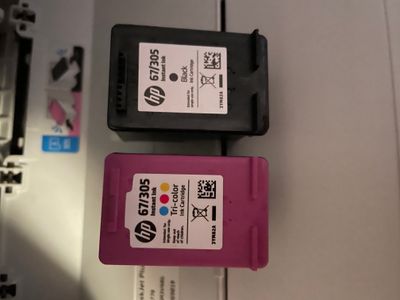
Please can anyone help my printer has stopped working and keeps flashing orange light in I and also orange light net display I don’t  know what to do it’s also saying my ink isn’t compatible when 

46A3CD53-9BB5-4075-827E-1C685A91637A.jpeg

A7F4EFC8-1DBA-4839-A73D-2CA44B141E77.jpeg

1 REPLY 1
HP Recommended

@Frankec6422, Welcome to the HP Support Community! I’m here to help.


I see that you are not able to use the printer due to these blinking lights. This condition occurs when at least one ink cartridge needs attention or is faulty, incorrect, missing, damaged, or incompatible.

Check ink cartridge compatibility, reseat one or both ink cartridges, clean the ink cartridge contacts, restart the printer, and replace one or both ink cartridges if necessary. For detailed troubleshooting, go to Ink Cartridge Errors.


Press the i Button to print the information page.


For more info on this issue, kindly refer to this document - Blinking Lights


If the issue persists, please reach out to the HP Technical Support team in your region regarding the service/replacement options. 

Follow the instructions below to reach them:


1) Click on this link - https://support.hp.com/us-en/contact-hp

2) Select your product type below.

3) Enter the serial of your device. 

4) Select the country from the drop-down. 

5) Select the chat or get phone number options based on your preferences. 

6) Fill out the webform and proceed further.


If you are having trouble navigating through the above options, it's most likely because the device is out of warranty. If yes, you may use this link to find the phone number of the regional HP Support team: HP Phone Assist Worldwide


Keep me posted for any other assistance.


Please click “Accept as Solution” if you feel my post solved your issue, it will help others find the solution.

Click on the YES button to reply that the response was helpful and/or to say “Thank You”.

Have a great day! 

KUMAR0307
I am an HP Employee

Archived This topic has been archived. Information and links in this thread may no longer be available or relevant. If you have a question create a new topic by clicking here and select the appropriate board.
† The opinions expressed above are the personal opinions of the authors, not of HP. By using this site, you accept the <a href="https://www8.hp.com/us/en/terms-of-use.html" class="udrlinesmall">Terms of Use</a> and <a href="/t5/custom/page/page-id/hp.rulespage" class="udrlinesmall"> Rules of Participation</a>.