• ×
    Information
    Need Windows 11 help?
    Check documents on compatibility, FAQs, upgrade information and available fixes.
    Windows 11 Support Center.
  • post a message
  • ×
    Information
    Need Windows 11 help?
    Check documents on compatibility, FAQs, upgrade information and available fixes.
    Windows 11 Support Center.
  • post a message
Guidelines
Seize the moment! nominate yourself or a tech enthusiast you admire & join the HP Community Experts!
Archived This topic has been archived. Information and links in this thread may no longer be available or relevant. If you have a question create a new topic by clicking here and select the appropriate board.

HP Recommended
HP iNKTANK WIRELESS 415
Microsoft Windows 10 (64-bit)

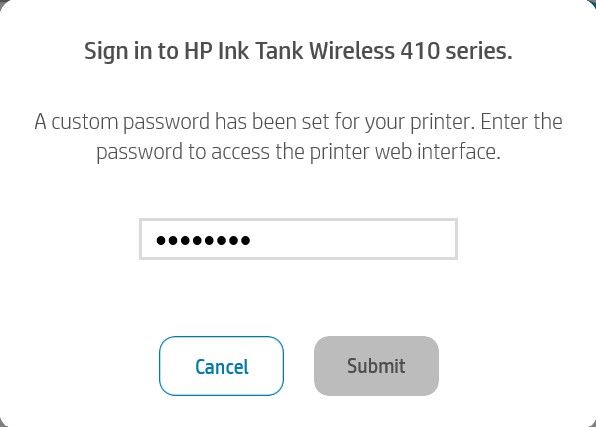
I am trying to connect to another wifi but I am always prompted with this dialog everytime:

Screenshot 2021-02-26 010241.jpg

Link: Link to Image 

I've been trying to search online but not one seems to solve it.  Is doing a factory  reset my best option? If yes, then how do I do it?

Note:
-My wifi router doesn't have WPS.
-HP Support chat bot is not good at all!  Please bring back real people to handle support.

3 REPLIES 3
HP Recommended

@naid415


Welcome to the HP support community.


Restore network settings to default settings

Press the Wireless button and the Cancel button from the printer control panel at the same time, and then hold them for three seconds.


Refer page number 68 in this user guide for steps to connect the printer to the router again:- Click here


Let me know how it goes.

To thank me for my efforts to help you, please mark my post as an accepted solution so that it benefits several others.

Cheers.

Sandytechy20
I am an HP Employee

HP Recommended

That doesn't solve it. What I need is the factory reset for the printer. The one that also resets the admin password.  Resetting the network settings prompts me to type in the admin password(which I forgot) and I see that dialog again.  The image that I attached.

HP Recommended

@naid415


This might require one on one interaction to fix the issue.

I request you to talk to HP support.

They might have multiple options to help you with this.

  1. Click on this link - https://support.hp.com/us-en/contact-hp?openCLC=true
  2. Select the country.
  3. Enter the serial of your device.
  4. Select the country from the drop-down.
  5. Click on "Show Options".
  6. Fill the web-form. A case number and phone number will now populate for you

Let me know how it goes.

To thank me for my efforts to help you, please mark my post as an accepted solution so that it benefits several others.

Cheers.

Sandytechy20
I am an HP Employee

Archived This topic has been archived. Information and links in this thread may no longer be available or relevant. If you have a question create a new topic by clicking here and select the appropriate board.
† The opinions expressed above are the personal opinions of the authors, not of HP. By using this site, you accept the <a href="https://www8.hp.com/us/en/terms-of-use.html" class="udrlinesmall">Terms of Use</a> and <a href="/t5/custom/page/page-id/hp.rulespage" class="udrlinesmall"> Rules of Participation</a>.