• ×
    Information
    Need Windows 11 help?
    Check documents on compatibility, FAQs, upgrade information and available fixes.
    Windows 11 Support Center.
  • post a message
  • ×
    Information
    Need Windows 11 help?
    Check documents on compatibility, FAQs, upgrade information and available fixes.
    Windows 11 Support Center.
  • post a message
Guidelines
Seize the moment! nominate yourself or a tech enthusiast you admire & join the HP Community Experts!
Archived This topic has been archived. Information and links in this thread may no longer be available or relevant. If you have a question create a new topic by clicking here and select the appropriate board.

HP Recommended
LASERJET PRO MFP M521dn

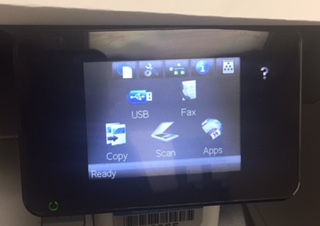
Hello. I sent a fax on 04/10/17 by usual method e.g. entering the tel no and pressing send. The next fax that I sent, I attempted the usual method e.g. entering tel no and pressing send - the touchscreen didn't respond when I hit the FAX icon on the touchscreen. I touched other icons on the touchscreen and nothing happened when I did that as well. I restarted and unplugged the machine and allowed it to reboot up again. I tried to fax again and no response from touchscreen - same response for other options e.g. copy, scan etc. The big part of the touch screen just won't respond at all, but if I hit the "?" button other options pop up on the big part of the screen, but again, it doesnt respond to my touch. I attempted again today with the same steps of attempting and restarting machine - still does not respond.  I did read yesterday about a reset button for the screen on some machines when this happens (touch screen does not respond) being somewhere on the machine, but I felt around and couldn't figure out where it might be - same with the "dots" that people wrote about to recalibrate the touchscreen - any help or feedback is appreciated.


FAX SCREEN.jpg

Archived This topic has been archived. Information and links in this thread may no longer be available or relevant. If you have a question create a new topic by clicking here and select the appropriate board.
† The opinions expressed above are the personal opinions of the authors, not of HP. By using this site, you accept the <a href="https://www8.hp.com/us/en/terms-of-use.html" class="udrlinesmall">Terms of Use</a> and <a href="/t5/custom/page/page-id/hp.rulespage" class="udrlinesmall"> Rules of Participation</a>.