• ×
    Information
    Need Windows 11 help?
    Check documents on compatibility, FAQs, upgrade information and available fixes.
    Windows 11 Support Center.
  • post a message
  • ×
    Information
    Need Windows 11 help?
    Check documents on compatibility, FAQs, upgrade information and available fixes.
    Windows 11 Support Center.
  • post a message
Guidelines
Seize the moment! nominate yourself or a tech enthusiast you admire & join the HP Community Experts!
Archived This topic has been archived. Information and links in this thread may no longer be available or relevant. If you have a question create a new topic by clicking here and select the appropriate board.

HP Recommended
HP ENVY Photo 7855 All-in-One Printer
Microsoft Windows 10 (64-bit)

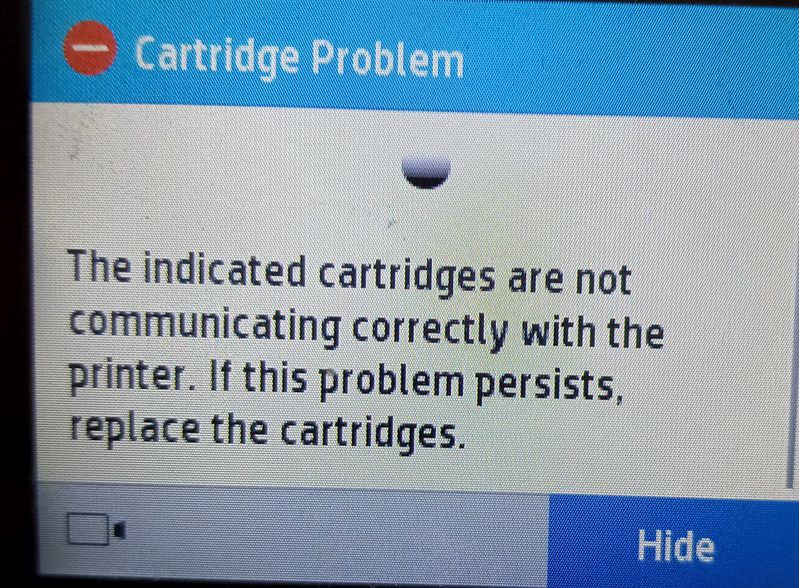
Ran out of black ink for my HP 7855 printer, bought a new HP 64 cartridge, when installed I get a "cannot communicate with cartridge" error message.  Since then, I have:

1) done all recommended troubleshooting, no help

2) bought another new cartridge, same problem

3) put old cartridge back in, of course, it works fine

4) looked at HP community to discover that this is a new and widespread problem

5) the only way to get any real help is to buy HP support services for $19.99

Conclusion - HP made some kind of change to the cartridges or the print drivers that now make HP printer cartridges incompatible with HP printers --Brilliant

Doubt I will be buying anything HP again.  


3 REPLIES 3
HP Recommended

@Snoopy123456789

Thank you for posting on the HP Support Community.
 

Don't worry as I'll be glad to help, apologize for the inconvenience caused, to provide an accurate resolution, I need a few more details:

  • Could you please share the picture of the error message screen?
  • When was the last time it worked fine?

Keep me posted for further assistance.


ECHO_LAKE
I am an HP Employee

HP Recommended

Picture attached. As I mentioned in my post, the printer works fine anytime I put an old cartridge in, but when I put a brand new cartridge in (tried several) I get the attached error message and the printer ceases to operate until error is resolved, but there doesn't seem to be a resolution to the error.   HP obviously changed something in their drivers or manufacturing process that prohibits new HP cartridges from communicating with HP printers.  I even saw a question on here from another user that said that he bought a brand new printer and the cartridge that came with the new printer in the box couldn't communicate with the printer. HP printer error screen.jpg

HP Recommended

@Snoopy123456789

Thank you for posting back.


If you have already performed the steps from the document: https://support.hp.com/in-en/document/c04100778 and the issue persists, it could be a hardware failure. 


I'm sending out a private message to assist you with the next course of action. Please check your Private message icon on the upper right corner of your HP Community profile Next, to your profile Name, you should see a little blue envelope, please click on it or simply click on this link: https://h30434.www3.hp.com/t5/notes/privatenotespage
 

Hope this helps! Keep me posted for further assistance.
Please click “Accept as Solution” if you feel my post solved your issue, it will help others find the solution. Click the “Kudos, Thumbs Up" on the bottom right to say “Thanks” for helping!

ECHO_LAKE
I am an HP Employee

Archived This topic has been archived. Information and links in this thread may no longer be available or relevant. If you have a question create a new topic by clicking here and select the appropriate board.
† The opinions expressed above are the personal opinions of the authors, not of HP. By using this site, you accept the <a href="https://www8.hp.com/us/en/terms-of-use.html" class="udrlinesmall">Terms of Use</a> and <a href="/t5/custom/page/page-id/hp.rulespage" class="udrlinesmall"> Rules of Participation</a>.