• ×
    Information
    Need Windows 11 help?
    Check documents on compatibility, FAQs, upgrade information and available fixes.
    Windows 11 Support Center.
  • post a message
  • ×
    Information
    Need Windows 11 help?
    Check documents on compatibility, FAQs, upgrade information and available fixes.
    Windows 11 Support Center.
  • post a message
Guidelines
Join the HP Community Solve‑a‑thon | Help Others & Share Your Solutions | Live on Zoom | 2:30 PM to 2:30 AM IST | Every Wednesday Click here to know more
Archived This topic has been archived. Information and links in this thread may no longer be available or relevant. If you have a question create a new topic by clicking here and select the appropriate board.

HP Recommended
HP OfficeJet Pro 6970
Microsoft Windows 10 (64-bit)

I would like to print a backscene which will make it the proper scale if printed at 300 dpi. Is this possible on this machine please, if so how do I set things up. Thanking you.

3 REPLIES 3
HP Recommended

@Thetowawns


Welcome to HP Support Forums. 🙂 I came across your post and would like to help.


I understand that you have an HP OfficeJet Pro 6970 All-in-One Printer and would like to print a back scene which will make it the proper scale if printed at 300 dpi. 


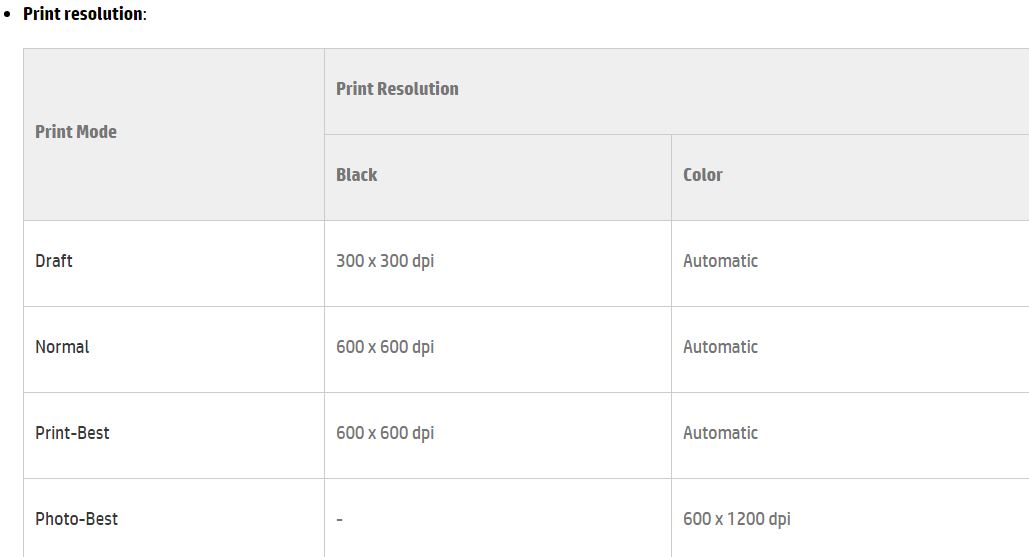
I did some research nd found the printing specifications of the printer as shown below:


The more the dpi (print resolution), the better the image quality will be and the more ink is used. It depends on the application you use. You can check for print settings in Windows using this link: http://hp.care/2fGdGOy (Though this link is for Win8, the steps are same for Win10). 


Hope this information helps. Feel free to let me know if you have any questions. Cheers! 🙂

HP Recommended

Thanks for the reply Kazi, I may have mislead you a bit , not being very computer literate but this was the the explaination which went with the download, 

This backscene is supplied as a full length file and will measure 287mm tall x 1995mm wide when printed at 300dpi, and has been optimised for OO/HO scale use but can be easily reduced in size to suit your requirements and other scales such as N gauge, when printing via Adobe Reader.

Supplied as a download and print Adobe PDF file (zipped for speed and ease of delivery).

Can you still help please ?

HP Recommended

@Thetowawns


You are welcome and thanks for the detailed information. 🙂


I suggest you to print as an Image in Adobe and check if that helps. 


Hope this helps. Let me know. 🙂

Archived This topic has been archived. Information and links in this thread may no longer be available or relevant. If you have a question create a new topic by clicking here and select the appropriate board.
† The opinions expressed above are the personal opinions of the authors, not of HP. By using this site, you accept the <a href="https://www8.hp.com/us/en/terms-of-use.html" class="udrlinesmall">Terms of Use</a> and <a href="/t5/custom/page/page-id/hp.rulespage" class="udrlinesmall"> Rules of Participation</a>.