• ×
    Information
    Need Windows 11 help?
    Check documents on compatibility, FAQs, upgrade information and available fixes.
    Windows 11 Support Center.
  • post a message
  • ×
    Information
    Need Windows 11 help?
    Check documents on compatibility, FAQs, upgrade information and available fixes.
    Windows 11 Support Center.
  • post a message
Guidelines
Join the HP Community Solve‑a‑thon | Help Others & Share Your Solutions | Live on Zoom | 2:30 PM to 2:30 AM IST | Every Wednesday Click here to know more
Archived This topic has been archived. Information and links in this thread may no longer be available or relevant. If you have a question create a new topic by clicking here and select the appropriate board.

HP Recommended
HP Envy 4500

Hi 

My wireless printing works but when I attach my cable, my PC desktop with windows 7 home premium doesn't recognize it. I tried hooking this up to my macbook pro and the computer recognized it althogh it didn't have the drivers for it. So I know it is not the cable itself that has an issue. I've tried this on a number of ports on the computer . They are all USB 2.0.

Thanks!
Jon

1 REPLY 1
HP Recommended

Hi@jon


1 Step - Disconnected USB from the computer. 


2 Step - Restart the Printer . 


3 Step - Uninstall the printer from your computer. 


  1. If your printer connects to the computer with a USB cable, disconnect the cable from the printer.
  2. Search Windows for programs and features, and then click Programs and Features in the list of results.
  3. In the list of installed programs, click your HP printer name, and then click Uninstall or Yes.
  4. If a User Account Control message displays, click Yes.
  5. Follow the on-screen instructions to complete the software removal.
    If the software uninstall process does not start or an error displays while uninstalling, download Fix problems that block programs from being installed or removed (in English) from the Microsoft website, and then try uninstalling again.
      

     4 Step - Remove printer under printer server properties. 


Go to devices and printers folder. 


Right click on HP ENVY Printer if Listed and remove device. 


  1. Navigate to the Control Panel, and open Devices and Printers, Printers, orPrinters and Faxes.
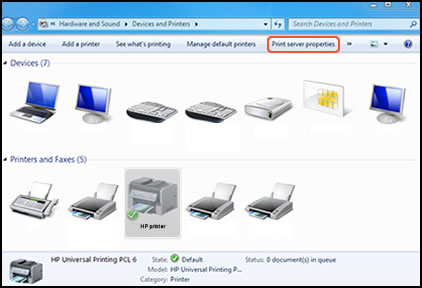
  2. Click the icon for your printer, then click Print server properties.
  3.  
    Figure : Location of Print server properties
    Image: Location of Print server properties
     NOTE:
    If Print server properties does not display, right-click an empty area in the Printers window, select Run as administrator from the drop-down menu, and then selectServer Properties
     
    Click on the driver tab on top 
     
    If ENVY Printer is listed select the printer and click on remove. 
    Choose remove driver & driver package . 
    Printer will be removed from the devices and printers . 
     
     
    5 Step -  Restart your PC 
     
    6 Step - Reinstall your printer software and connect the USB only when it prompts you to connect on the installation screen 
     

    To simply say thanksplease click the "Thumbs Up" button to give me a Kudos to appreciate my    efforts to help.


    If this helps, please mark this as “Accepted Solution” as it will help several others with the same issue to get it resolved without hassles. 


    Take care now and have a splendid week ahead. 

Archived This topic has been archived. Information and links in this thread may no longer be available or relevant. If you have a question create a new topic by clicking here and select the appropriate board.
† The opinions expressed above are the personal opinions of the authors, not of HP. By using this site, you accept the <a href="https://www8.hp.com/us/en/terms-of-use.html" class="udrlinesmall">Terms of Use</a> and <a href="/t5/custom/page/page-id/hp.rulespage" class="udrlinesmall"> Rules of Participation</a>.