• ×
    Information
    Need Windows 11 help?
    Check documents on compatibility, FAQs, upgrade information and available fixes.
    Windows 11 Support Center.
  • post a message
  • ×
    Information
    Need Windows 11 help?
    Check documents on compatibility, FAQs, upgrade information and available fixes.
    Windows 11 Support Center.
  • post a message
Guidelines
Seize the moment! nominate yourself or a tech enthusiast you admire & join the HP Community Experts!
Archived This topic has been archived. Information and links in this thread may no longer be available or relevant. If you have a question create a new topic by clicking here and select the appropriate board.

HP Recommended

Just installed the unit a hp officejet 3830 - trying to get the scanner to pull from the feeder (multiple pages) instead of scanning from the glass

do not see any instructions regarding this in the manual

1 REPLY 1
HP Recommended

@Cindy28


Let me take a moment to thank you for posting on the HP Support Forums. 


I understand that you have an  HP OfficeJet 3830 All-in-One Printer and would like to know how to scan using the ADF (automatic document feeder). I'll surely assist you with this. 


I suggest you to refer to the below steps to scan using the ADF. (Source: http://hp.care/2ri8J70


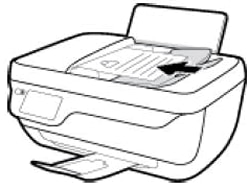
  • ADF: Place the item into the document feeder tray. The print side faces up and the top edge goes into the tray first. Adjust the paper-width guides to fit the item.
  • NOTE: Do not load photos in the ADF. Use the scanner glass instead to prevent damage to photos.

Figure : Place item print side facing up

Image: Place item print side facing up


How to Scan from the Computer (Mac)

How to Scan from the Computer (Windows)


I hope this information helps. Feel free to let me know if you have any questions. Cheers! 🙂


Archived This topic has been archived. Information and links in this thread may no longer be available or relevant. If you have a question create a new topic by clicking here and select the appropriate board.
† The opinions expressed above are the personal opinions of the authors, not of HP. By using this site, you accept the <a href="https://www8.hp.com/us/en/terms-of-use.html" class="udrlinesmall">Terms of Use</a> and <a href="/t5/custom/page/page-id/hp.rulespage" class="udrlinesmall"> Rules of Participation</a>.