• ×
    Information
    Need Windows 11 help?
    Check documents on compatibility, FAQs, upgrade information and available fixes.
    Windows 11 Support Center.
  • post a message
  • ×
    Information
    Need Windows 11 help?
    Check documents on compatibility, FAQs, upgrade information and available fixes.
    Windows 11 Support Center.
  • post a message
Guidelines
Seize the moment! nominate yourself or a tech enthusiast you admire & join the HP Community Experts!
Archived This topic has been archived. Information and links in this thread may no longer be available or relevant. If you have a question create a new topic by clicking here and select the appropriate board.

HP Recommended
envy 6055
Microsoft Windows 10 (64-bit)

how do I turn the printer off


17 REPLIES 17
HP Recommended

anybody home?

HP Recommended

Hi,

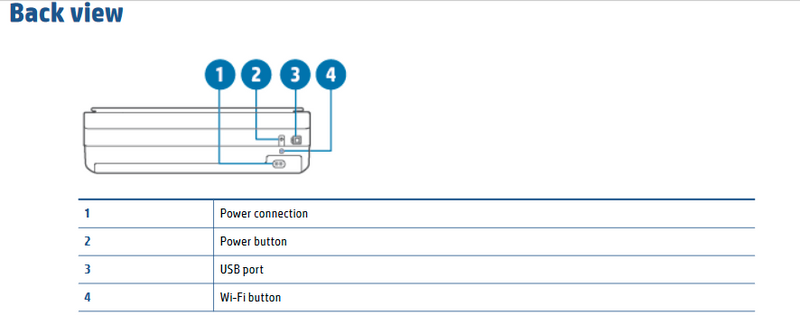
The power button is at the back of your printer:

ShlomiL_0-1594355603226.png


Cheers,

Shlomi


Click the Yes button to reply that the response was helpful or to say thanks.
If my post resolve your problem please mark it as an Accepted Solution 🙂
HP Recommended

Not so on Envy 6055

HP Recommended

I did have an HP Envy 6055 printer right next to me when replied to your question...

Can you please add a picture of the back of your printer?


Also, here is its User Guide:

http://h10032.www1.hp.com/ctg/Manual/c06584210


Shlomi


Click the Yes button to reply that the response was helpful or to say thanks.
If my post resolve your problem please mark it as an Accepted Solution 🙂
HP Recommended

The switch is on the back right hand side of printer to switch off!

HP Recommended

DOESNT WORK FOR ME. I HAVE NEW 6055


HP Recommended

Another post told me to look on the back of the printer...and there it was!!!

HP Recommended

I finally found it but what a pain. Lousy customer support so I have to come here to get a simple answer? beautiful machine. Really poor virtual support and too many roadblocks to get to a human.

HP Recommended

HP really bombed with this subject seems like everyone wants to know and furthermore I would love to download the manual so that I could learn what the other icons are for but I just keep getting an error message. 

Archived This topic has been archived. Information and links in this thread may no longer be available or relevant. If you have a question create a new topic by clicking here and select the appropriate board.
† The opinions expressed above are the personal opinions of the authors, not of HP. By using this site, you accept the <a href="https://www8.hp.com/us/en/terms-of-use.html" class="udrlinesmall">Terms of Use</a> and <a href="/t5/custom/page/page-id/hp.rulespage" class="udrlinesmall"> Rules of Participation</a>.