• ×
    Information
    Need Windows 11 help?
    Check documents on compatibility, FAQs, upgrade information and available fixes.
    Windows 11 Support Center.
  • post a message
  • ×
    Information
    Need Windows 11 help?
    Check documents on compatibility, FAQs, upgrade information and available fixes.
    Windows 11 Support Center.
  • post a message
Guidelines
Ready to level up? Join the Expert Program—
HP Recommended
HP Envy 4500

Can someone please let me know what issue Error Code OXB838FDOE coresponds to and what I can do to resolve it? Thanks!

3 REPLIES 3
HP Recommended

@MMALINOWSKI

 
Greetings!

 
Welcome to the HP Community. This is a great place to get support, find answers and tips to your technical queries. I have reviewed your post and I understand, there's an issue with the "0x.." error.


Don't worry, I'm here to help! The "0x.." error is related to the ink system failure. 


Let's try these steps -


1) Take out the cartridges. 
2) Unplug the power cord from the printer & wall. 
3) Wait for 30 seconds.  
4) Plug the power cord back into the printer and wall, ensure the printer is plugged into the wall & not to a surge protector. 
5) Insert the cartridges back into the printer.


Also, try cleaning the ink cartridges. Refer to the step# 3, 4 and 5 from this document.


Hope this helps!


Let me know how that goes.


To thank us for our efforts to help you, click here to access your public post and Select - "Accept as solution" and click on the blue "Thumbs up".  
 

Have a great day!

Asmita
I am an HP Employee

HP Recommended

Hi Asmita,


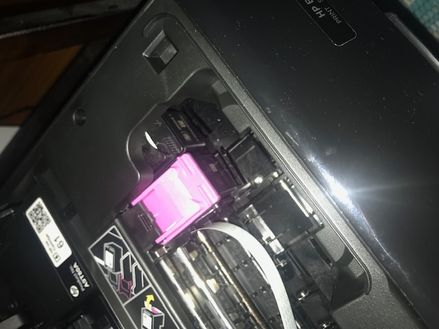
Thank you very much for this potential soluton! However, I am unable to move one of the ink cartridges to take it out as it is stuck under a part of the printer and will not move as demonstrated by the attached photo (Apologies the photo is side ways and I am unable to rotate it). I am able to get the pink catridge out but the black one is stuck. Do you have any tips on how I can get the black cartridge out? Please let me know. Thank you in advance for your help!image1.jpeg

HP Recommended

@MMALINOWSKI


Thanks for trying those steps.  I have sent you a Private Message with the steps specific to your printer.


Check next to your profile Name, you should see a little blue envelope, please click on it. Click here for more details on how to access the private messages on HP Forums.


Have a great day!

Asmita
I am an HP Employee

† The opinions expressed above are the personal opinions of the authors, not of HP. By using this site, you accept the <a href="https://www8.hp.com/us/en/terms-of-use.html" class="udrlinesmall">Terms of Use</a> and <a href="/t5/custom/page/page-id/hp.rulespage" class="udrlinesmall"> Rules of Participation</a>.