• ×
    Information
    Need Windows 11 help?
    Check documents on compatibility, FAQs, upgrade information and available fixes.
    Windows 11 Support Center.
  • post a message
  • ×
    Information
    Need Windows 11 help?
    Check documents on compatibility, FAQs, upgrade information and available fixes.
    Windows 11 Support Center.
  • post a message
Guidelines
Seize the moment! nominate yourself or a tech enthusiast you admire & join the HP Community Experts!
HP Recommended
HP Sprocket 200
iOS 12 - 12.0.1

Hi, 

I just bought HP sprocket yesterday. I've done all setup and update to the newest firmware.

I used ZINK paper with get with the HP sprocket. 


I've tried https://support.hp.com/th-en/document/c05660842. 

But it didn't work. My HP still printing with Pink Tint.


Please help 

3 REPLIES 3
HP Recommended

@nut_paniita


Welcome to the HP Support Community!


Let us try to Reset your mobile device and Sprocket 

Turn off your mobile device, and then turn it back on.

Turn on the Sprocket.

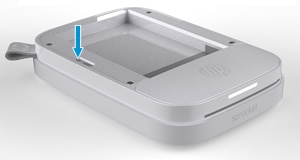
Locate the Reset button: Remove the paper cover, and then use a narrow object, such as a pen or paperclip, to press and hold the Reset button for 3 seconds. The Sprocket resets and turns off.

Locating the Reset button on the HP Sprocket 200 Printer


If you have followed all the steps mentioned in this document and if the issue still persists,  please contact our HP Support team for Service Options:

1) Click on this link - https://support.hp.com/us-en/contact-hp

2) Select your product type below.

3) Enter the serial of your device.

4) Select the country from the drop-down.

5) Select the appropriate option based on your preference.

6) Fill the web-form and proceed further.


Keep me posted for any other assistance.


Please click “Accept as Solution” if you feel my post solved your issue, it will help others find the solution. Click the “Kudos/Thumbs Up" on the bottom right to say “Thanks” for helping!

KUMAR0307
I am an HP Employee

HP Recommended

It doesn't work

HP Recommended

@nut_paniita

  • If the reset did not solve the issue, Please contact our HP Support team for Service Options as mentioned in the above post.
  • If you are not able to contact the Support team, please check your inbox as I will be sending you the contact information via private message.
  • In order to access your private messages, click the private message icon on the upper right corner of your HP Forums profile, next to your profile Name or simply click on this link: https://h30434.www3.hp.com/t5/notes/privatenotespage

Keep me posted for further assistance.

KUMAR0307
I am an HP Employee

† The opinions expressed above are the personal opinions of the authors, not of HP. By using this site, you accept the <a href="https://www8.hp.com/us/en/terms-of-use.html" class="udrlinesmall">Terms of Use</a> and <a href="/t5/custom/page/page-id/hp.rulespage" class="udrlinesmall"> Rules of Participation</a>.