• ×
    Information
    Need Windows 11 help?
    Check documents on compatibility, FAQs, upgrade information and available fixes.
    Windows 11 Support Center.
  • post a message
  • ×
    Information
    Need Windows 11 help?
    Check documents on compatibility, FAQs, upgrade information and available fixes.
    Windows 11 Support Center.
  • post a message
Guidelines
Ready to level up? Join the Expert Program—
HP Recommended
Sprocket 200

I own a Sprocket 200. I was printing a lot of pictures and it stopped printing. I decided to try to shut it off and then turn it back on. Now it currently won’t shut off. 

1 REPLY 1
HP Recommended

@kotaelliott10 

Hello,

In order to palliate this issue, please reset the printer as follows:

  1. Make sure the printer is on.
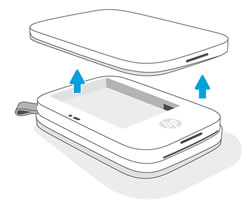
  2. Remove the paper cover.
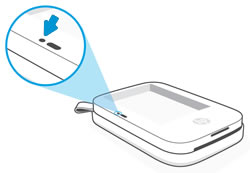
  3. Locate the Reset button.
  4. With a paperclip or pin, press and hold the Reset button until the Charging Indicator light turns off.
    The printer resets and turns off.
  5. Replace the paper cover, and then turn on the printer.

I remain at your disposal in case of need.

Best regards,:Wink:


I'm not an HP employee. Did this message answer your question? Include it below as an Accept As Solution! Did you find this message useful?  Click on the thumbs up set to give a Compliment! Follow us on Facebook Assistance customers HP.

† The opinions expressed above are the personal opinions of the authors, not of HP. By using this site, you accept the <a href="https://www8.hp.com/us/en/terms-of-use.html" class="udrlinesmall">Terms of Use</a> and <a href="/t5/custom/page/page-id/hp.rulespage" class="udrlinesmall"> Rules of Participation</a>.