• ×
    Information
    Need Windows 11 help?
    Check documents on compatibility, FAQs, upgrade information and available fixes.
    Windows 11 Support Center.
  • post a message
  • ×
    Information
    Need Windows 11 help?
    Check documents on compatibility, FAQs, upgrade information and available fixes.
    Windows 11 Support Center.
  • post a message
Guidelines
Seize the moment! nominate yourself or a tech enthusiast you admire & join the HP Community Experts!
Archived This topic has been archived. Information and links in this thread may no longer be available or relevant. If you have a question create a new topic by clicking here and select the appropriate board.

HP Recommended
Hp10g2
Other

I am trying to figure out were the WiFi setting is at on this tablet for internet. But the tablets in some Else name and she has died

4 REPLIES 4
HP Recommended

@Ashley21
Thank you for posting on the HP Support Community.


Let's try this:
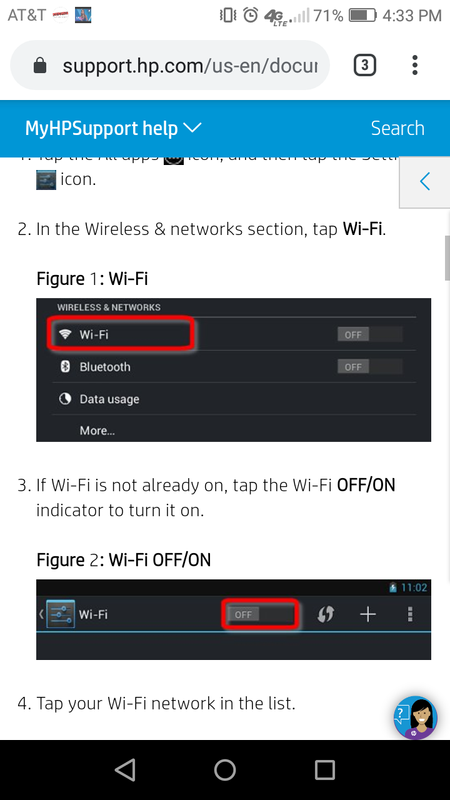
Navigate: Settings > Connections > Wi-Fi. For software version 7.1.1 or earlier, navigate: Settings > Wi-Fi. Tap the Wi-Fi switch (upper-right) to turn on or off.


Hope this helps! Keep me posted for further assistance.
Please click “
Accept as Solution” if you feel my post solved your issue, it will help others find the solution.

ECHO_LAKE
I am an HP Employee

HP Recommended

It does have the WiFi option to turn on in.the setting is that normal

HP Recommended

Screenshot_2019-11-13-16-33-59.png

It doesn't have the option of turning on the WiFi in the.setting I look all.It has

HP Recommended

@RPryor
Thank you for posting back. 


You should select the ICON next to WiFi options. 

Click here: https://www.youtube.com/watch?v=gTyUgeVhPN4 for YouTube video on Connecting to a Wireless Network with Android 4.1 Jelly Bean (HP Slate 7 Tablet) 


Hope this helps! Keep me posted for further assistance.
Please click “
Accept as Solution” if you feel my post solved your issue, it will help others find the solution.


ECHO_LAKE
I am an HP Employee

Archived This topic has been archived. Information and links in this thread may no longer be available or relevant. If you have a question create a new topic by clicking here and select the appropriate board.
† The opinions expressed above are the personal opinions of the authors, not of HP. By using this site, you accept the <a href="https://www8.hp.com/us/en/terms-of-use.html" class="udrlinesmall">Terms of Use</a> and <a href="/t5/custom/page/page-id/hp.rulespage" class="udrlinesmall"> Rules of Participation</a>.