
-
×InformationNeed Windows 11 help?Check documents on compatibility, FAQs, upgrade information and available fixes.
Windows 11 Support Center. -
-
×InformationNeed Windows 11 help?Check documents on compatibility, FAQs, upgrade information and available fixes.
Windows 11 Support Center. -
- HP Community
- Archived Topics
- Tablets and Mobile Devices Archive
- Windows update issue

Create an account on the HP Community to personalize your profile and ask a question
Your account also allows you to connect with HP support faster, access a personal dashboard to manage all of your devices in one place, view warranty information, case status and more.
 This topic has been archived. Information and links in this thread may no longer be available or relevant. If you have a question create a new topic by clicking here and select the appropriate board.

10-11-2019 07:46 AM
 HP Recommended
Product: HP Notebook - 15q-dy0004au
Operating System: Microsoft Windows 10 (64-bit)
I was watching usual stuff on YouTube, latter after getting bored I went to shutdown my laptop. Upon clicking the power icon it showed an option stating "update and restart".(Earlier couple of days ago I was notified that an update has download and it was asking for a desire time to update, which I ignored) I had enough time so I clicked on "update and restart". The process began, it was quite slow and I was also expecting the same but it got struck at 23%. The loading symbol: the circle which revolves also stopped. It's been 6hrs now(while I'm writing), the hp support isn't working well for me now, the service agent lines are closed as it is past 6:00pm here(as of now). I'm really frightened as there is no service center near by and I don't want to lose any data. I'll attach the photo of the struck window along. Please respond as soon as possible. Also understand if there are any flaws in the writing as it is my first post here.
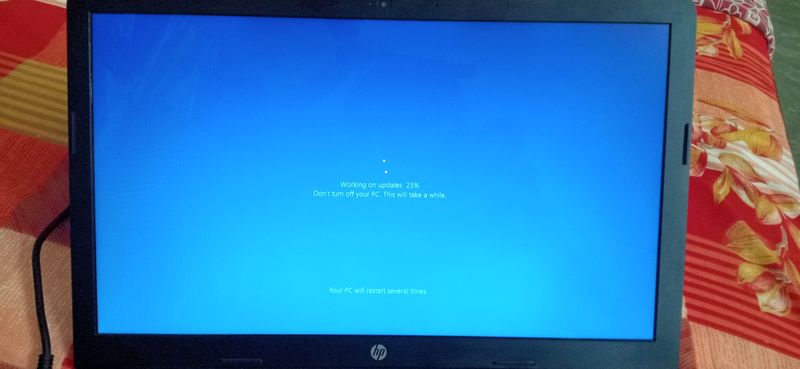
Solved! Go to Solution.
1 ACCEPTED SOLUTION
Accepted Solutions


10-11-2019 08:01 AM
HP Recommended
Hi,
Turn off the PC by holding the power button until shutdown. Turn the PC back on again and let me know what happens. It should either undo the update, or continue with the update.
You will be able to recover the data even if the update fails.
Let me know,
David
7 REPLIES 7
10-11-2019 08:01 AM
HP Recommended
Hi,
Turn off the PC by holding the power button until shutdown. Turn the PC back on again and let me know what happens. It should either undo the update, or continue with the update.
You will be able to recover the data even if the update fails.
Let me know,
David
10-11-2019 12:56 PM
HP Recommended
Great. I am happy it is up and running again. It is quite late here in Italy, so I am on my mobile. Tommorow I will get back to you and we can see together how to completely update the notebook.
Have a nice evening.
Regards,
David
10-13-2019 11:47 PM - edited 10-13-2019 11:48 PM
HP Recommended
Hi,
Yes, try updating the system again and see if it works. Remove any external devices attached to the PC.
First, back up any important data on an external drive or to the cloud. You should always backup your data.
Let me know,
David
This topic has been archived. Information and links in this thread may no longer be available or relevant. If you have a question create a new topic by clicking here and select the appropriate board.
† The opinions expressed above are the personal opinions of the authors, not of HP. By using this site, you accept the Terms of Use and Rules of Participation.


Didn't find what you were looking for?
Ask the community
† The opinions expressed above are the personal opinions of the authors, not of HP. By using this site, you accept the <a href="https://www8.hp.com/us/en/terms-of-use.html" class="udrlinesmall">Terms of Use</a> and <a href="/t5/custom/page/page-id/hp.rulespage" class="udrlinesmall"> Rules of Participation</a>.