• ×
    Information
    Need Windows 11 help?
    Check documents on compatibility, FAQs, upgrade information and available fixes.
    Windows 11 Support Center.
  • post a message
  • ×
    Information
    Need Windows 11 help?
    Check documents on compatibility, FAQs, upgrade information and available fixes.
    Windows 11 Support Center.
  • post a message
Guidelines
Join the HP Community Solve‑a‑thon | Help Others & Share Your Solutions | Live on Zoom | 2:30 PM to 2:30 AM IST | Every Wednesday Click here to know more
HP Recommended

I have Savi 8200 UC Series headset that has a T -bar on the side. As per the documentation there is a ANC switch on the headset itself, but I didn't see it on my headset anywhere. In the desktop app also I have not seen any way enable or disable the ANC setting. 


It was all working suddenly people are complaining about the surrounding office noise. Also, the serial number mentioned S/N [personal info removed] is not found our your website. 


Please help me, this is very annoying to be on call and mute myself all the time.

1 REPLY 1
HP Recommended

Hello kuul13, welcome to the HP Poly community.
I am sorry to hear that you are facing this issue with the Poly Savi 8200 UC
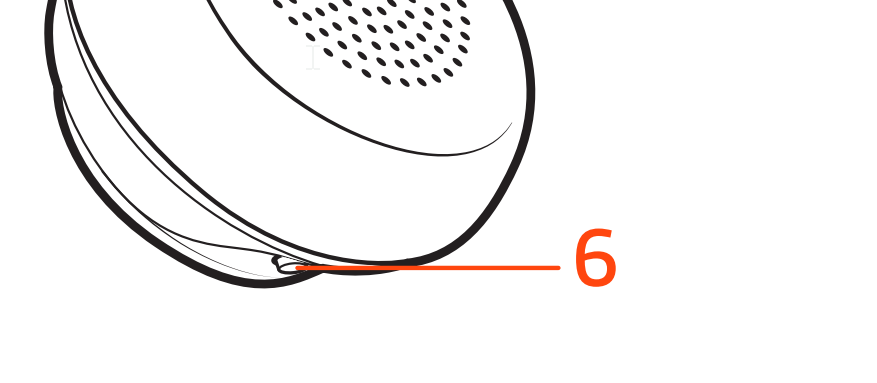
ANC feature is available in the headset. Please check the image provided below as the feature is available in the other speaker where the microphone is not attached where you can toggle on or off.

Active Noise Canceling (ANC) reduces external noise and enhances your music and sound quality. Your headset ships with ANC on. To turn ANC off, slide the switch away from "ANC."

Regards,
Meghana

I'm an HP Employee.


If this reply helped resolve your issue, please select the Accept as Solution as it helps others in the community quickly find the answer they’re looking for.


And if you found this reply helpful, clicking Yes below is a great way to let us know we’re providing the support you need, as it encourages us to keep improving and sharing helpful guidance.

† The opinions expressed above are the personal opinions of the authors, not of HP. By using this site, you accept the <a href="https://www8.hp.com/us/en/terms-of-use.html" class="udrlinesmall">Terms of Use</a> and <a href="/t5/custom/page/page-id/hp.rulespage" class="udrlinesmall"> Rules of Participation</a>.