• ×
    Information
    Need Windows 11 help?
    Check documents on compatibility, FAQs, upgrade information and available fixes.
    Windows 11 Support Center.
  • post a message
  • ×
    Information
    Need Windows 11 help?
    Check documents on compatibility, FAQs, upgrade information and available fixes.
    Windows 11 Support Center.
  • post a message
Guidelines
Seize the moment! nominate yourself or a tech enthusiast you admire & join the HP Community Experts!
Archived This topic has been archived. Information and links in this thread may no longer be available or relevant. If you have a question create a new topic by clicking here and select the appropriate board.

HP Recommended
ProBook 450G2
Microsoft Windows 7 (64-bit)

Hi,


It's been awhile since I've tried updating any software and drivers mainly due to the premise "If it ain't broke, don't fix it" because when I try, usually something breaks. And here I am, I tried running a new game (COD Warzone) and wanted to update Video drivers. What are the newest drivers I can run on my Machine and how to install them? Here's what I've done so far:


1. I had the stock drivers, I believe version 14.x., that came with the laptop, in C:/System/SWSetup/SP70475 is where the Catalyst Control Center setup can be found.

2. I looked up on the AMD site via GPU, it told me Catalyst Control Center is retired, download AMD Adrenaline 2020. I downloaded, isntalled by doing clean install. Started computer, and AMD systray icon stated "AMD Display driver not found or this is not the appropriate driver". System restore.

3. Downloaded AMD auto-detect tool. Again, it recommended similar driver - not the latest, but previous version which was stable (from Dec 2020). Install, boot, same error. This time there was no system restore available. Just uninstall.

4. Went to a site driveridentifier.com, installed their tool and it told me best driver is sp92097which I downloaded. Installed. Again, it wasn't working.

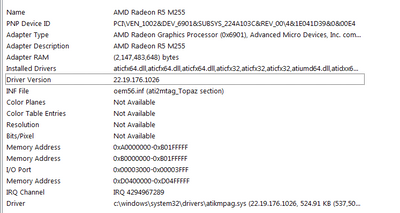
5. Now these processes switched on Windows update (which I had turned off years ago, Win7 is outdated anyway) and for the last 2 days I've been running updates. Win Update found a driver for my AMD and installed it:

---

When check sys information:

netizen-vr_0-1610396729182.png

This is what I see. However, I don't think the AMD driver is working properly, but just my Intel, because I just ran a benchmark test from "https://www.userbenchmark.com" and it stated:
           WARN: skipping AMD Radeon R5 M255 - unable to locate attached display
(whole report is here: https://www.userbenchmark.com/UserRun/38320351)
At the same time I don't have a Catalyst Control Center or anything by AMD on my laptop.

Where do I go from here? Do  I revert to original AMD driver, or is there a newer one  I can install ...and how?


Thank you!

-Miroslav

Archived This topic has been archived. Information and links in this thread may no longer be available or relevant. If you have a question create a new topic by clicking here and select the appropriate board.
† The opinions expressed above are the personal opinions of the authors, not of HP. By using this site, you accept the <a href="https://www8.hp.com/us/en/terms-of-use.html" class="udrlinesmall">Terms of Use</a> and <a href="/t5/custom/page/page-id/hp.rulespage" class="udrlinesmall"> Rules of Participation</a>.