• ×
    Information
    Need Windows 11 help?
    Check documents on compatibility, FAQs, upgrade information and available fixes.
    Windows 11 Support Center.
  • post a message
  • ×
    Information
    Need Windows 11 help?
    Check documents on compatibility, FAQs, upgrade information and available fixes.
    Windows 11 Support Center.
  • post a message
Guidelines
Seize the moment! nominate yourself or a tech enthusiast you admire & join the HP Community Experts!
Archived This topic has been archived. Information and links in this thread may no longer be available or relevant. If you have a question create a new topic by clicking here and select the appropriate board.

HP Recommended
HP Pavilion Gaming - 15-dk0132tx
Microsoft Windows 10 (64-bit)

My GIG: HP Pavilion Gaming - 15-dk0132tx
(I'm using this machine for 4 months now and I'm very much satisfied with the performance!)

Wireless Network Adapter: Intel® Wireless-AC 9560 802.11a/b/g/n/ac (2x2) Wi-Fi® and Bluetooth® 5 Combo

The Problem:

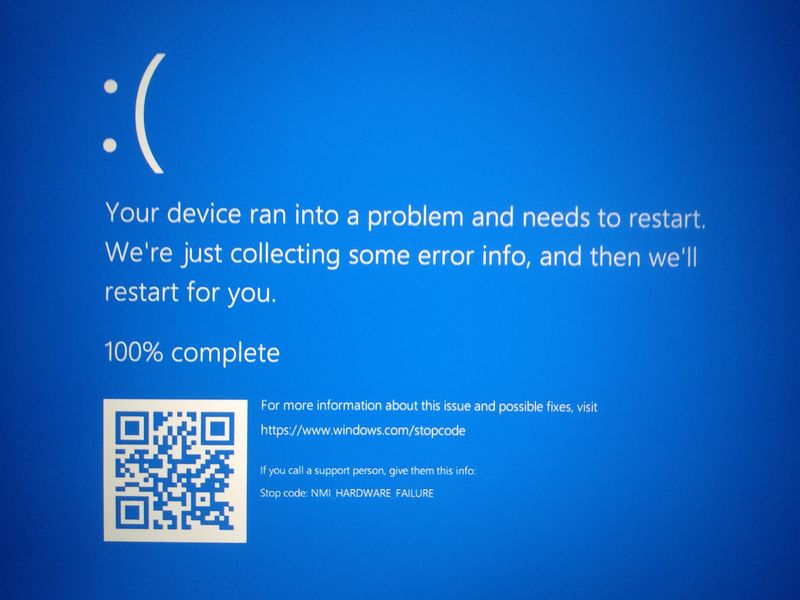
1.  Random Blue Screen Error when I use the laptop connected to the WIFI

2. The Blue Screen says NMI_HARDWARE_FAILOUR
2. The Error appears both in the working state and in the Idle state (Very randomly, 3-4 times a day)
3. When the BSoD appears sometimes it restarts automatically and sometimes just freeze on that screen


Basic Troubleshooting I performed:

Test with Ethernet:
1. Used Laptop with plugged in an Ethernet Connection (leaving Wifi ON) - BSoD Not Appear

2. Used Laptop with plugged in an Ethernet Connection (leaving Wifi OFF) - BSoD Not Appear
3. Used Laptop with plugged in an Ethernet Connection (Disabled WIFI Device from Device Manager) - BSoD Not Appear


- Result: Works Perfectly with an Ethernet Connection

Test with USB WIFI Dongle:
1. Disabled Built-in Wifi from Windows Device Manager
2. Plugged In TP-Link USB Wifi Dongle (Realtek RTL8188EU Wireless LAN 802.11n USB 2.0 Network Adapter)
3. Connect with my Wifi Router
4. Boom! BSoD NMI_HARDWARE_FAILOUR error appeared 3 times in 1 hour!!


- Result: Even Worst!

Test with Software and Updates:

 1. Fresh Install Windows 10 Pro x64 20H2 Several Times (Installed both USB install and Reset this pc from Setting and Recovery option inside windows )
2. Uninstall, Update, Rollback from Windows Device Manager Several Times
3. Download Latest Driver from Intel Website and Install
4. Download Latest Driver Again from HP Support Page then Install

- Result: NO LUCK with any of the above steps!


I have also changed my router once but that didn't help as well

I was thinking to replace the built-in WIFI card before the USB WIFI Dongle test but Since the problem remains the same with an external dongle I think the problem is not the Hardware! 

What can be the possible reason and solution for this problem?

I'd really appreciate your help regarding this problem.  Thanks!

-----------------------------------------------------------------------------------------------------


Laptop's General specifications:

Device: hp pavilion gaming 15 dk0132tx laptop

CPU: Intel Core i5 9300H @ 2.40GHz [Coffee Lake 14nm Technology]

RAM: 8 GB DDR4-2666 SDRAM (1 x 8 GB)

Chipset: Intel® HM370

Motherboard: HP 85FC (U3E1)

Graphics:

  1. Intel UHD Graphics 630 (HP)
  2. 4095MB NVIDIA GeForce GTX 1650 (HP)

Storage: 512GB SanDisk SD7SB2Q-512G-1006 SATA - PCIe® NVMe™ M.2 SSD

Network Adapters:

  1. Wireless = Intel® Wireless-AC 9560 802.11a/b/g/n/ac (2x2) Wi-Fi® and Bluetooth® 5 Combo
  2. LAN = Realtek Gaming GbE Family Controller

Audio: Realtek High Definition Audio


OS Version: Windows 10 Pro 64-bit (20H2)


IMG_20201012_155048.jpg


Archived This topic has been archived. Information and links in this thread may no longer be available or relevant. If you have a question create a new topic by clicking here and select the appropriate board.
† The opinions expressed above are the personal opinions of the authors, not of HP. By using this site, you accept the <a href="https://www8.hp.com/us/en/terms-of-use.html" class="udrlinesmall">Terms of Use</a> and <a href="/t5/custom/page/page-id/hp.rulespage" class="udrlinesmall"> Rules of Participation</a>.