• ×
    Information
    Need Windows 11 help?
    Check documents on compatibility, FAQs, upgrade information and available fixes.
    Windows 11 Support Center.
  • post a message
  • ×
    Information
    Need Windows 11 help?
    Check documents on compatibility, FAQs, upgrade information and available fixes.
    Windows 11 Support Center.
  • post a message
Guidelines
Seize the moment! nominate yourself or a tech enthusiast you admire & join the HP Community Experts!
Archived This topic has been archived. Information and links in this thread may no longer be available or relevant. If you have a question create a new topic by clicking here and select the appropriate board.

HP Recommended
Microsoft Windows 10 (64-bit)

my laptop (hp Elitebook 2760p has just lost its touch screen capability). What do I do?

1 REPLY 1
HP Recommended

Solving Touch Screen Problems

First determine if the problem is hardware or software by performing a hard reset followed by running UEFI diagnostics.

Turn on the computer by holding the power button down for 20 full seconds then release.
Press the Power button one more time (if necessary) to start the computer.
Tap the ESC key about once a second after you see the LEDs on the keyboard flash.
Press F2 to run diagnostics: (v) 2.6 or later is recommended.


If there are no touch screen diagnostics, or the test is old, then get the latest UEFI diagnostics:

HP releases newer UEFI diagnostics periodically.
When you select F2 during boot you are requesting UEFI diagnostics.
There is an updated diagnostics package Click Here
Look for the phrase 'issues outside the OS',
Expand the'+'symbol and click the DOWNLOAD button.
The version of the UEFI diagnostics is shown at the left of that DOWNLOAD button.
When you press F2 to run diagnostics please ensure the version is the new one.


If the touch screen works during diagnostics then the problem is windows related.
First try running the Windows 10/11 troubleshooter.

Now try to perform Windows Updates

In the Windows search box, type and open Windows Updates.
Check for updates.
If the updates are available, click on install and restart the computer.


If the issue still persists, I would suggest to reinstall the original HP display drivers using this link.
You may update the Bios from our HP support website but only if the latest HP Support Assistant recommends it.,

Refer this link to know how to use HP support assistant.

If the issue persists, attempt to run a test using the HP hardware diagnostic tool,

The touchscreen test can be reached by following the below steps:

Turn on the computer and immediately press Esc repeatedly, about once every second.
When the menu appears, press the F2 key.
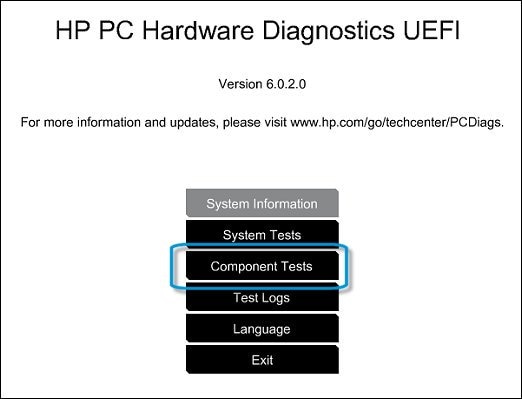
On the main menu, click Component Tests.

Selecting Component Tests from the main menu


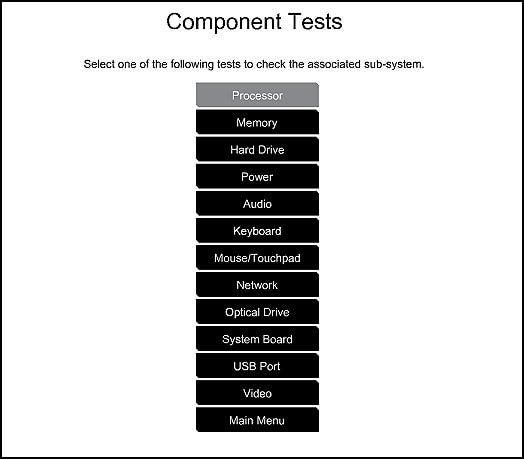
The Component Tests menu displays. Your Component Tests menu might be different,
depending on the components installed on your computer.

Sample list of Component Tests


Inside the component test, you should see an option for the Touch Screen Test.
Quick interactive test to determine if the touch screen is functioning correctly.
To run the test, click Touch Screen, and then click Run once.

You can also go through the steps suggested in the support document
HP PCs - Troubleshooting Touch Screen Issues (Windows 10,


Thank you for using HP products and posting to the community.
I am a community volunteer and do not work for HP. If you find
this post useful click the Yes button. If I helped solve your
problem please mark this as a solution so others can find it
Archived This topic has been archived. Information and links in this thread may no longer be available or relevant. If you have a question create a new topic by clicking here and select the appropriate board.
† The opinions expressed above are the personal opinions of the authors, not of HP. By using this site, you accept the <a href="https://www8.hp.com/us/en/terms-of-use.html" class="udrlinesmall">Terms of Use</a> and <a href="/t5/custom/page/page-id/hp.rulespage" class="udrlinesmall"> Rules of Participation</a>.