• ×
    Information
    Need Windows 11 help?
    Check documents on compatibility, FAQs, upgrade information and available fixes.
    Windows 11 Support Center.
  • post a message
  • ×
    Information
    Need Windows 11 help?
    Check documents on compatibility, FAQs, upgrade information and available fixes.
    Windows 11 Support Center.
  • post a message
Guidelines
Seize the moment! nominate yourself or a tech enthusiast you admire & join the HP Community Experts!
Archived This topic has been archived. Information and links in this thread may no longer be available or relevant. If you have a question create a new topic by clicking here and select the appropriate board.
HP Recommended
HP Deskjet Ink Advantage 4535
Microsoft Windows 10 (64-bit)

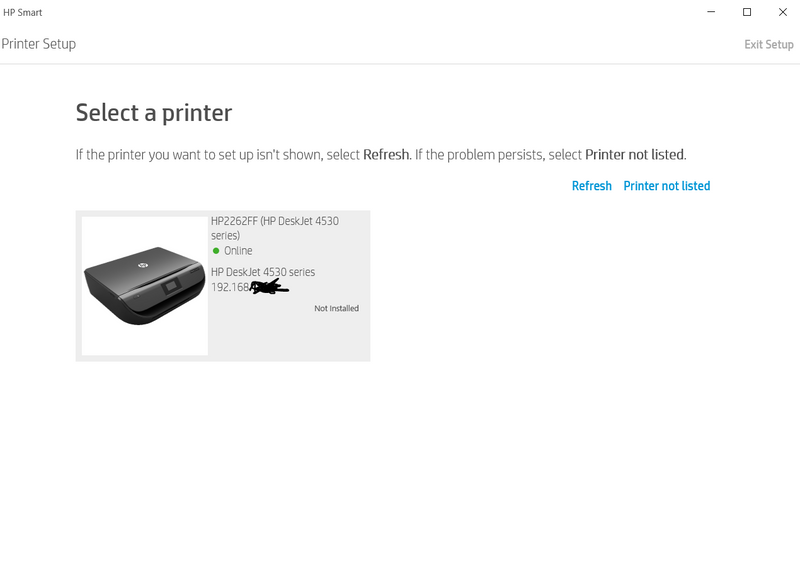
Hi, I've been troubleshooting this for a long time and I need help. I already checked the internet for a fix and I already followed the steps indicated here: https://support.hp.com/bg-en/document/c05032099. I already uninstalled all HP programs using revo uninstaller, removed the driver from printer server, rebooted my printer, PC, and router. I make sure both printer and my PC connected to the same wifi network/SSID. I checked the IP address and manually inputted it in control panel and windows 10 settings but still it wont connect. The HP printer sometimes showed as online but when I click it, the response was my printer is offline even it is not. I can print and scan using my android's HP smart app but when I try to use the same app from windows app store "HP smart",  It won't work.  Please help me solve this. I'll attach screenshots for reference. Thank you. HP Printer cannot be found.PNGHP Printer Online.PNGHP Printer Unsuccessful Network Installation.PNG

Archived This topic has been archived. Information and links in this thread may no longer be available or relevant. If you have a question create a new topic by clicking here and select the appropriate board.
† The opinions expressed above are the personal opinions of the authors, not of HP. By using this site, you accept the <a href="https://www8.hp.com/us/en/terms-of-use.html" class="udrlinesmall">Terms of Use</a> and <a href="/t5/custom/page/page-id/hp.rulespage" class="udrlinesmall"> Rules of Participation</a>.