Sorry, there was an error with your nomination, please try again.
Required fields can't be empty, please try again.
Create an account on the HP Community to personalize your profile and ask a question
Your account also allows you to connect with HP support faster, access a personal dashboard to manage all of your devices in one place, view warranty information, case status and more.
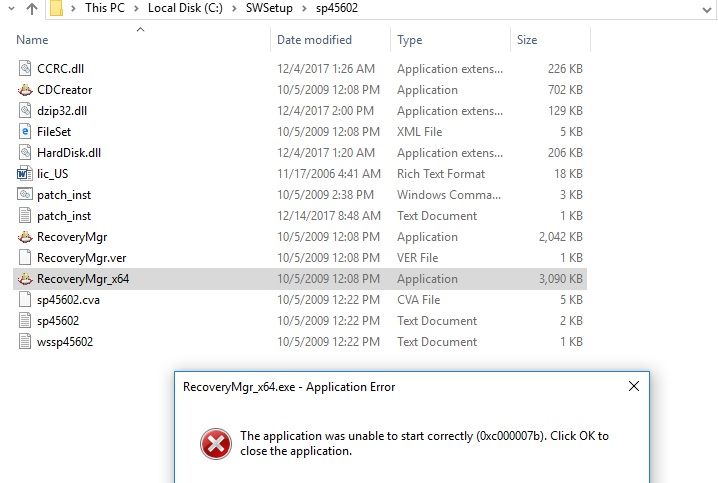
When I install this exe on my Window 10 Pc version 10.0.14393. I found these file in the installation folder (C:\SWSetup\sp45602\) wssp45602.txt, sp45602.txt, sp45602.cva, RecoveryMgr_x64 application file, RecoveryMgr.ver, RecoveryMgr Application File, patch_inst.txt, patch_inst, lic_US.doc, FileSet Xml File and CDCreator Application File
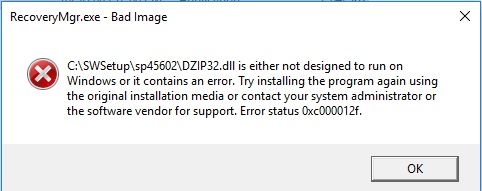
When I run RecoveryMgr_x64 application file as Run as administrator It prompt the message that following dll ( CCRC.dll, dzip32.dll, HardDisk.dll ) are missing. After Download these Dll and put in installer folder I again run the Exe. Now it prompt following message
and Another meassage
Try to search the solution of these error and found that uninstall one of these updates KB2936068/KB2879017
But when i chek in my pc Program and features These updates file not available.
How can I Instal this software on my PC so I can use this ?