Sorry, there was an error with your nomination, please try again.
Required fields can't be empty, please try again.
Create an account on the HP Community to personalize your profile and ask a question
Your account also allows you to connect with HP support faster, access a personal dashboard to manage all of your devices in one place, view warranty information, case status and more.
Last night, Windows 10 quietly installed an update on my 2-week-old HP laptop... and it has completely broken my laptop. I started the day with Blue Screen of Death, and it's just got worse from there.
Uninstalling the "Quality update" didn't work, restoring from a previous Restore Point didn't work, and I've repeatedly seen messages saying it's trying to fix the problem, but it fails miserably. I even ended up with a Blue Screen of Death in German, and a Blue Screen of Death where only the top eighth of the QR-code was visible. It's a mess.
Now, I was able to go through the bootup menus, type in the 48-digit BitLocker code (?!!) to get to a Command Prompt, so I could backup my C: files onto a USB disc. So, my 1Tb HP SDD is in there, and can be read.
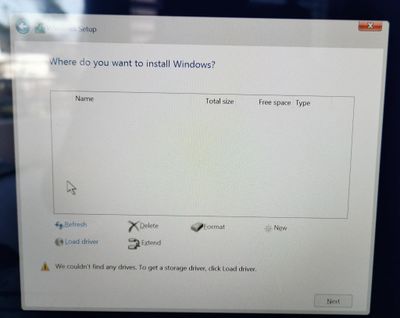
But.... out of desperation, I grabbed a Windows 10 install USB stick, went through the menus, but it doesn't recognise that my laptop has a 1Tb SSD in it. The Windows installer doesn't see it... so I can't even reinstall Windows.
Reading through the blogs, some users have suggested going into the BIOS and turning off "Secure Boot", I've done that, but it made no difference.
How do I get the Windows 10 installer to recognise that my laptop has a 1Tb SSD in it ?
(Disclaimer: before this morning, I hadn't reinstalled Windows, or changed any of the hardware which came from HP two weeks ago...)