Sorry, there was an error with your nomination, please try again.
Required fields can't be empty, please try again.
Create an account on the HP Community to personalize your profile and ask a question
Your account also allows you to connect with HP support faster, access a personal dashboard to manage all of your devices in one place, view warranty information, case status and more.
I bought this gaming desktop during November 2020, and it has been occasionally (3-5 times per week) freezes for a few seconds and auto restart while gaming (I play Genshin Impact and League of Legends).
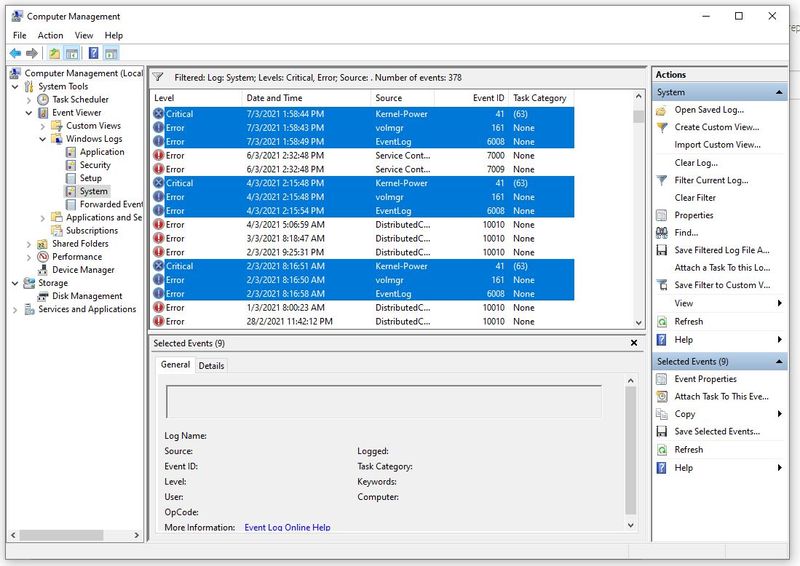
I have noticed these three event ID (see image below, event ID are 41, 161, and 6008) always come together every time I faced the issue.
I suspected it would be due to faulty graphic card (RTX 2060), as when I feedback to the vendor, he said the other customer who bought this exact model of desktop at the same batch with me, have more serious issue, the customer will get auto restart every single time he started a game. What I know is he got HP technician to replace the graphic card and the problem has since be gone.
I have tried hardware diagnostic test from HP and external software, but all got positive result on every part of the hardware. I have updated the BIOS, all drivers, and the problem is still here.
What can I do next? Contact HP to replace the graphic card too?