• ×
    Information
    Need Windows 11 help?
    Check documents on compatibility, FAQs, upgrade information and available fixes.
    Windows 11 Support Center.
  • post a message
  • ×
    Information
    Need Windows 11 help?
    Check documents on compatibility, FAQs, upgrade information and available fixes.
    Windows 11 Support Center.
  • post a message
Guidelines
Seize the moment! nominate yourself or a tech enthusiast you admire & join the HP Community Experts!
HP Recommended

Yes, and it is connected to the motherboard into the PD129 port.


Cable has two sides: System and Add-In card


System side of the cable is plugged in PD129 port (TBT1),

Add-in card side of the cable is plugged in the TBolt card.

HP Recommended

Hi,


I reinstalled the system, and I have the same problem. 😞


So I guess there is something wrong with drivers, BIOS and HP.


Greetings.

HP Recommended

Hi,


I found the solution: Install latest SATA ASCI driver from:

https://www.catalog.update.microsoft.com/Search.aspx?q=sata


Intel Corporation - SCSIAdapter - 17.9.2.1013


Go to Device Manager and manually update drivers from the computer.


DriversDrivers


Thank you for your support.


Greetings.

HP Recommended

huh?...... the Intel Corporation - SCSIAdapter - 17.9.2.1013 is the intel RSTe (enterprise) driver for the onboard "SCU" sata ports


https://www.intel.com/content/dam/support/us/en/documents/ssdc/ssd-software/Intel_RSTe_NVMe_for_Wind...


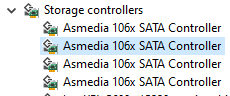
but the picture you show (which was the unknown SCSI device in your previous post) is a asmedia 106x chipset which is natively supported under windows 10 with it's built in driver


so are you saying installing the intel RSTe driver resolved a driver conflict on the Asmedia device?


last, the Intel RSTe driver MUST BE UPDATED USING THE INCLUDED INSTALLER PROGRAM, forcing a driver update via device manager can cause weird issues, read the RSTe install guide for more info

† The opinions expressed above are the personal opinions of the authors, not of HP. By using this site, you accept the <a href="https://www8.hp.com/us/en/terms-of-use.html" class="udrlinesmall">Terms of Use</a> and <a href="/t5/custom/page/page-id/hp.rulespage" class="udrlinesmall"> Rules of Participation</a>.