• ×
    Information
    Need Windows 11 help?
    Check documents on compatibility, FAQs, upgrade information and available fixes.
    Windows 11 Support Center.
  • post a message
  • ×
    Information
    Need Windows 11 help?
    Check documents on compatibility, FAQs, upgrade information and available fixes.
    Windows 11 Support Center.
  • post a message
Guidelines
Seize the moment! nominate yourself or a tech enthusiast you admire & join the HP Community Experts!
HP Recommended
HP z440
Microsoft Windows 10 (64-bit)


Hi all


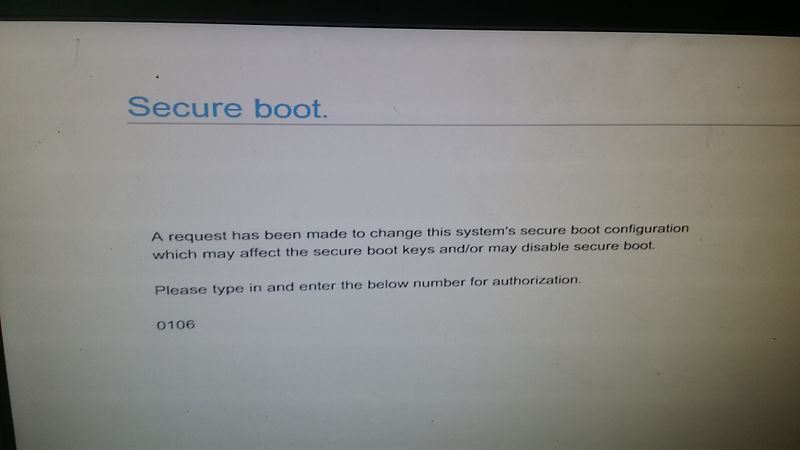
I wanted to change Secure Boot to disabled, but after reboot I'm stuck on this message:


Secure boot


A request has been made to change this system's secure boot configuration.

which may affect the secure boot keys and/or disable secure boot.


Please type in and enter the below number for authorization.


0106


I've tried two different keyboards (that worked previously), but it doesn't accept / register anything I type... so the only thing I can do is to hit the power button to turn the computer off, turn it back on and end up on the same message (different code, though) ! i tred also Clearing and resetting the CMOS by Pressing the Clear CMOS button but it doesn't accept!


Any one can help?


best20171126_084609.jpg


2 REPLIES 2
HP Recommended

Hi


Well sidestepping the issue, somewhat...


I suggest setting a supervisor password on the BIOS of something simple 'hp' and YES I know it seems stupid, and I am aware it sometimes works, depending on the BIOS maker.


What is want/need to disable Secure Boot for?

HP Recommended

Did you solve this issue? I'm having same now.

† The opinions expressed above are the personal opinions of the authors, not of HP. By using this site, you accept the <a href="https://www8.hp.com/us/en/terms-of-use.html" class="udrlinesmall">Terms of Use</a> and <a href="/t5/custom/page/page-id/hp.rulespage" class="udrlinesmall"> Rules of Participation</a>.