• ×
    Information
    Need Windows 11 help?
    Check documents on compatibility, FAQs, upgrade information and available fixes.
    Windows 11 Support Center.
  • post a message
  • ×
    Information
    Need Windows 11 help?
    Check documents on compatibility, FAQs, upgrade information and available fixes.
    Windows 11 Support Center.
  • post a message
Guidelines
Seize the moment! nominate yourself or a tech enthusiast you admire & join the HP Community Experts!
HP Recommended
HP 260 G2 DM
Microsoft Windows 10 (64-bit)

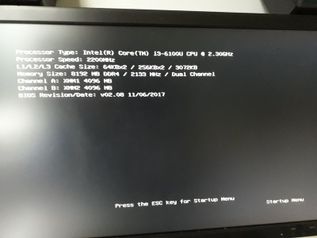
Hello, anyone with such combination of HW? I've got latest BIOS (released 12/04/2017), lastest FW for SSD, but computer can't start, even go to Setup or Boot menu. Num/Caps-Lock works, if I hit F9/F10 it states "Setup" or "Startup menu", but nothing happen. SSD itself is working fine in other PC (even the old HP one -  rp5700), also when attached via USB adapter. Currently I'm using Kingston Fury 120 GB SSD without any issues. I've tried older revision of 850 EVO 250 GB (V2, I've got V3), but same result. Thanks for any hints.


20171209_103835.jpg20171209_131417.jpg

13 REPLIES 13
HP Recommended

I've got exactly the same problem and the bad thing is that i've got 14 machines to upgrade and install.


Please HP, fix this ASAP!

HP Recommended

Maybe you have a chance to submit support case? Mine is out of warranty...

HP Recommended

I've "solved" it in a very special way - sent back the Samsung and ordered Intel 545s... Similar performance and costs few euros more. Don't have a time.


20171213_184305.jpg

HP Recommended

I have the same problem,  stuck at the black screen. No chance to go into BIOS (latest) or anything else. I tried 2 SSDs, both working on desktop PCs.

HP Recommended

Hey guys,


I had the exact same problem. Here is my story regarding this issue and how I fixed it.


I bought a brand new HP 260 G2 Mini PC. I also bought a new Samsung 850 EVO 250 GB SSD to install on my new mini pc. I had great experiences with Samsung SSD’s in the past so I thought this experience should be no different.


I was wrong.


I connected my new Samsung SSD to my new mini PC. I turned on the PC, and the same black screen showed up. I couldn’t get past the black screen. The computer just froze up when it got to this black screen.


20171209_103835.jpg


I put the Samsung SSD in another working computer of mine to see if the drive is bad. The drive was easily recognized on the other computer, so obviously the drive was not bad at all.  I tried formatting the drive and put it back in the HP 260 G2 to try it again. Same frozen black screen.


I called HP tech support. After spending MANY hours on the phone with them, they sent out a tech guy to replace my motherboard. The tech guy came out and did that. Nothing changed. The Samsung drive still did not work on the new machine.


I called HP tech support again. After spending another couple hours on the phone and talking to the supervisor, he concluded that the drive was just not compatible with the HP 260 G2. I asked him what drives are compatible with this machine. He said there is no list of compatible drives, but he said an HP branded SSD should be compatible.


I called Samsung. I spent an hour on the phone with a support agent. I tried to change bios options and tried other things. Nothing worked. They told me there is nothing they can do and that the drive may not be compatible.


I even took it to my local Best Buy geek squad to have them take a look. They couldn't do anything and said to try a different brand SSD.


By this time, I spent probably 16 hours of my time on this stupid problem. Instead of wasting more of my time by trying other branded drives, I decided just to buy an HP SSD since I knew that if that didn't work on this machine, nothing else will and something must be wrong with the machine. I bought an HP S700 256 GB PRO SSD. I found a great deal for a new one on Amazon. 


I received this drive in the mail and I immediately tried it to see if it will work. I connected it to my new PC and turned it on. On the very first try, the computer recognized the drive and it went straight to the installation screen. I installed Windows on the machine and everything worked fine.


The HP tech support agent, the Samsung support agent, and the Best Buy geek squad agent were all correct. For some reason, the Samsung SSD is not compatible with the HP 260 G2.


In conclusion, I had the HP SSD drive for a few weeks now and my HP 260 G2 is running great. The HP SSD is running virtually as good as a Samsung SSD would. I am satisfied with the HP SSD and I would recommend it to anyone. 


Here is a link to the exact HP SSD that I purchased in case anyone is interested: http://amzn.to/2nPFFzA


I hope this helps and I hope it saves hours of time and headaches that I went through.


If I have any future issues with my HP SSD, I will update this post.

HP Recommended

.

HP Recommended

I don't see that as a fix. HP needs to update their BIOS or something. I've solved it too with some other SSD's from Intel (don't see why I should use more expensive rebranded HP SSD's) and they are working fine. So my problem is "solved" too, but the issue is not resolved in my opinion.

HP Recommended

I agree. HP should update the BIOS.


However, the HP 256 GB PRO SSD that I bought was very competitively priced. It is cheaper than the equivalent Intel SSD and the specs are virtually identical.


I am happy with mine that I bought on Amazon http://amzn.to/2nPFFzA

HP Recommended

I have the same issue with a Crucial MX500 250Gb, tried 2 and both do the same yet will work with the original HDD

† The opinions expressed above are the personal opinions of the authors, not of HP. By using this site, you accept the <a href="https://www8.hp.com/us/en/terms-of-use.html" class="udrlinesmall">Terms of Use</a> and <a href="/t5/custom/page/page-id/hp.rulespage" class="udrlinesmall"> Rules of Participation</a>.