• ×
    Information
    Need Windows 11 help?
    Check documents on compatibility, FAQs, upgrade information and available fixes.
    Windows 11 Support Center.
  • post a message
  • ×
    Information
    Need Windows 11 help?
    Check documents on compatibility, FAQs, upgrade information and available fixes.
    Windows 11 Support Center.
  • post a message
Guidelines
Seize the moment! nominate yourself or a tech enthusiast you admire & join the HP Community Experts!
HP Recommended

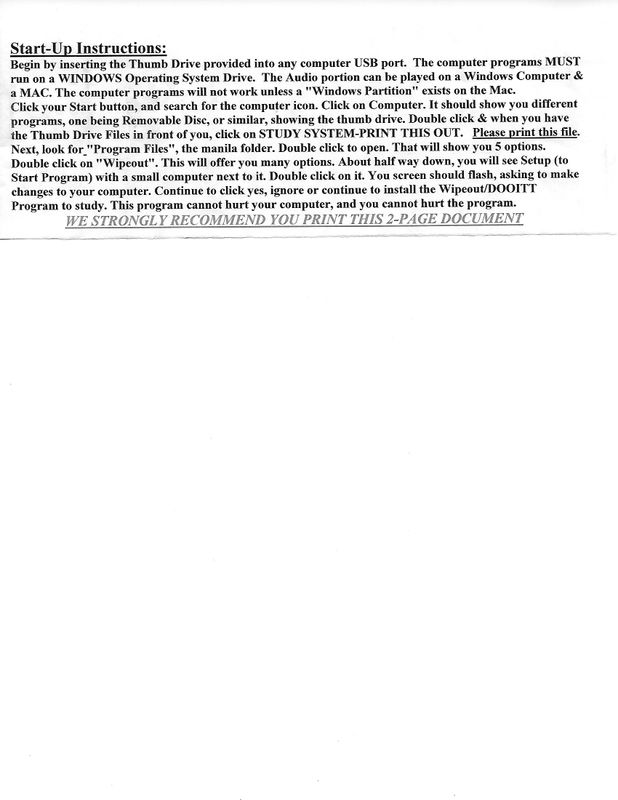
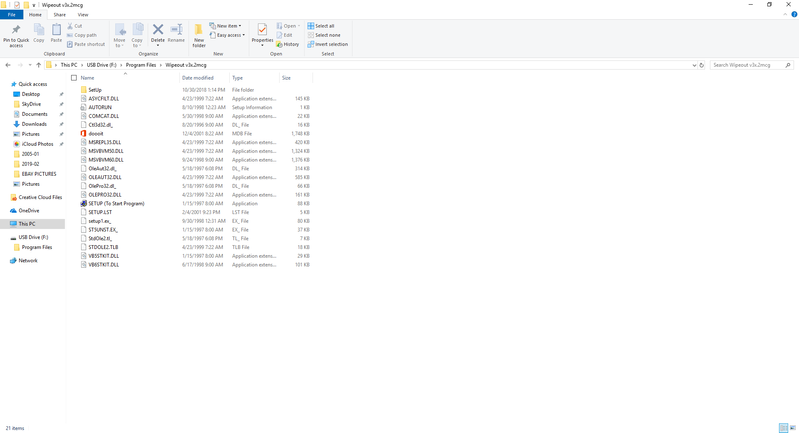
Sorry.  Here are two additional screens.  Hopefullt it will help.REAL ESTATE THUMB DRIVE INSTRUCTIONS.jpgREAL ESTATE THUMB DRIVE 3.PNG

HP Recommended

Any other ideas after the additional screenshots sent??

HP Recommended

Well the instructions say the same as I would have suggested.  In that last screenshot you can see in the Wipeout folder is the file called "SETUP (To Start Program).  The printed instructions say to double click on that file and it should start the Wipeout DOOIT.  It says to allow it to install, following the prompts.

Not Knowing what that program is supposed to do, I assume you know what to do with it after it does that.  I suspect the program will be usable after it is installed.


I'm not an HP employee.
Did this message answer your question? Please indicate below as an Accepted Solution!
Did you find this message useful? Click on the "Was this reply helpful" Yes button.
† The opinions expressed above are the personal opinions of the authors, not of HP. By using this site, you accept the <a href="https://www8.hp.com/us/en/terms-of-use.html" class="udrlinesmall">Terms of Use</a> and <a href="/t5/custom/page/page-id/hp.rulespage" class="udrlinesmall"> Rules of Participation</a>.