• ×
    Information
    Need Windows 11 help?
    Check documents on compatibility, FAQs, upgrade information and available fixes.
    Windows 11 Support Center.
  • post a message
  • ×
    Information
    Need Windows 11 help?
    Check documents on compatibility, FAQs, upgrade information and available fixes.
    Windows 11 Support Center.
  • post a message
Guidelines
Seize the moment! nominate yourself or a tech enthusiast you admire & join the HP Community Experts!
Check out our WINDOWS 11 Support Center info about: OPTIMIZATION, KNOWN ISSUES, FAQs, VIDEOS AND MORE.
HP Recommended
HP Pavillion Desktop 590-poxxx
Microsoft Windows 10 (64-bit)

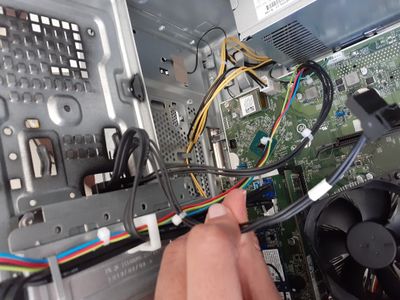
My HP Pavillion Desktop 590-poxxx suspiciously showed me a glitched out blue screen of death the day the warranty expired. I couldn't see the code bsod displays because it was screen tearing pretty bad. There was1 cable that was unplugged when I opened it and it is connected to the hard drive. However I do not know where to plug this thing in so I'm writing this. Help please.

15957017640415584848756275560947.jpg

2 REPLIES 2
HP Recommended

I did a system extensive test on this and these are the results:15957311805925975988230884512593.jpg

HP Recommended

 @Tecknowledgee The image from the extensive system test seems to have been blocked as it contains critical information such as serial number of your device, I would appreciate if you could simply respond with the failure ID written down on your post, if it failed, and if it passed, let us know that it passed.


As for the BSOD, I would request you to follow the below steps to capture and reply back with the error message/code to identify the issue and find a permanent fix:

  • In Windows, search for and open View advanced system settings.
  • In the Advanced tab, under Startup and Recovery, click Settings.
  • Under System Failure, remove the check mark next to automatically restart, and then click OK.
  • Restart the computer to apply the change.
  • The computer no longer restarts automatically when a blue screen error occurs.

For more details: click here

​​Please reply back with the error code as the issue is code specific and it would be rather easier to provide an accurate solution using the same.


P.S: Welcome to HP Community 😉


Keep us posted,

If you would like to thank us for our efforts to help you, 

Give us a virtual high-five by clicking the 'Thumbs Up' icon below, followed by clicking on the "Accept as solution" on this post, 

Have a great day! 

Riddle_Decipher
I am an HP Employee


Learning is a journey, not a destination.
Let's keep asking questions and growing together.
† The opinions expressed above are the personal opinions of the authors, not of HP. By using this site, you accept the <a href="https://www8.hp.com/us/en/terms-of-use.html" class="udrlinesmall">Terms of Use</a> and <a href="/t5/custom/page/page-id/hp.rulespage" class="udrlinesmall"> Rules of Participation</a>.